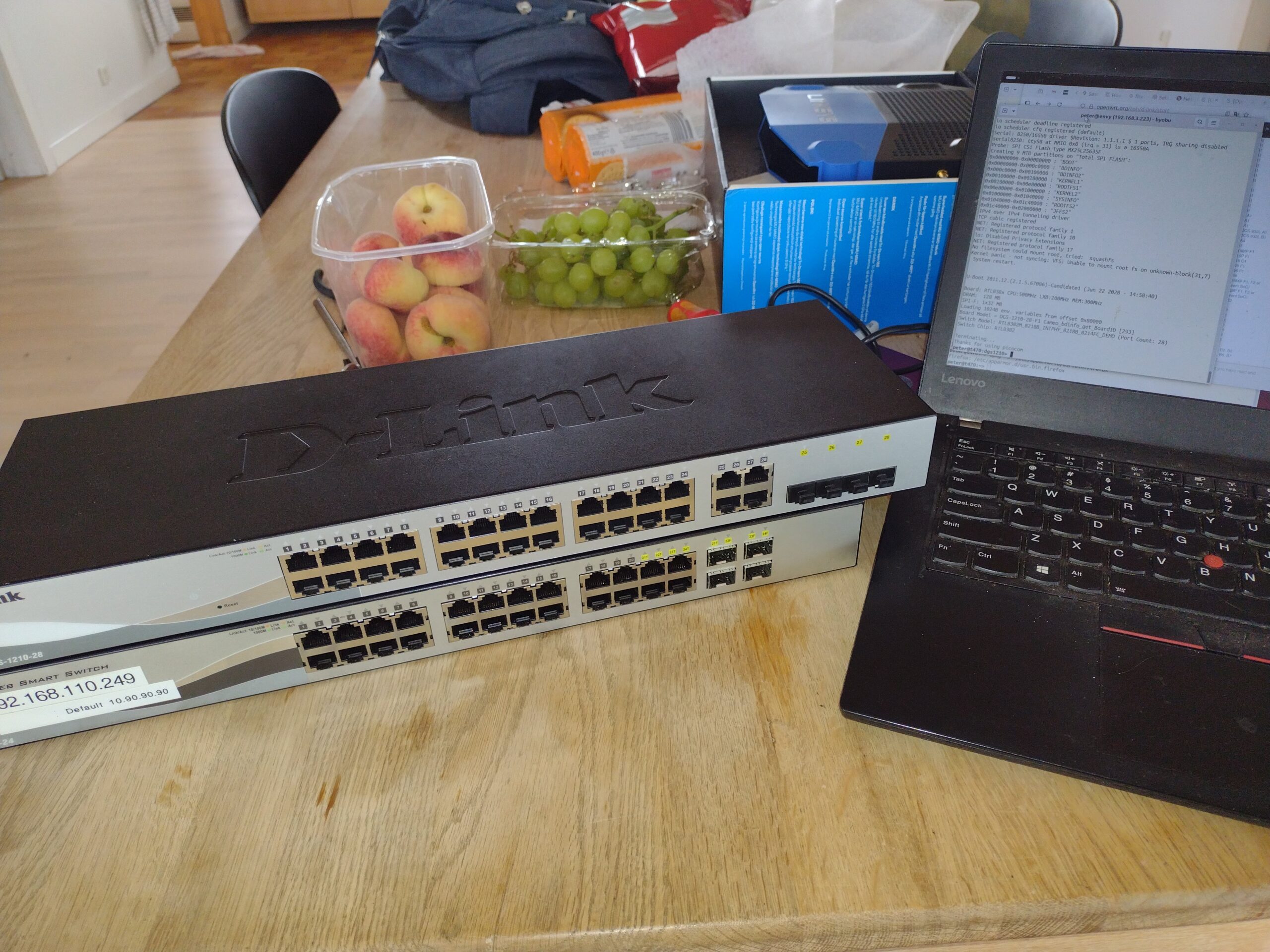
Recently, I bought 2 managed D-Link 1210 Gigabit Switches on eBay.de for 20 Euros each delivered.
- 24 port P/N EGS121024M..A1G,
H/W Ver A1,
F/W Ver 2.02.002 - 28 port DGS-1210-28,
H/W Ver F2,
S/W Ver 6.20.007
My intention was to install OpenWrt on the switches. I found these articles on Google
- Running OpenWrt on Switches FAQ
- svanheule.net: Linux support for Realtek switches
- svanheule.net: dgs-1210-28
- Product Page: dgs-1210-28-28-port-gigabit-smart-managed-switch
- Simon Imaginator: Should anyone ask, setting up OpenWRT on a D-Link DGS-1210-28 Switch
- GitHub: imaginator/home-network
- Dave Jansen: D-Link DGS-1210-28 Smart Managed Switch Brief Hardware Overview
- OpenWrt Forum: Support for RTL838x based managed switches
- OpenWrt Forum: Flashing D-Link DGS-1210-28 F2 revision with OpenWrt
- Web-interface on a factory reset DGS-1210-28
http://10.90.90.90/ password: admin
The newest OpenWrt firmware for the 28 port switch can be found at:
- firmware-selector.openwrt.org/ d-link_dgs-1210-28 24.10.1 (r28597-0425664679)
I downloaded the FACTORY_IMAGE1, which I installed via the WEB-server on the DGS-1210-28. It seems that there is provision for two Firmwares, so I installed OpenWrt as Image-2, selected the newly installed firmware and rebooted. Unfortunately, the device ended up in a boot-loop, The device was bricked.
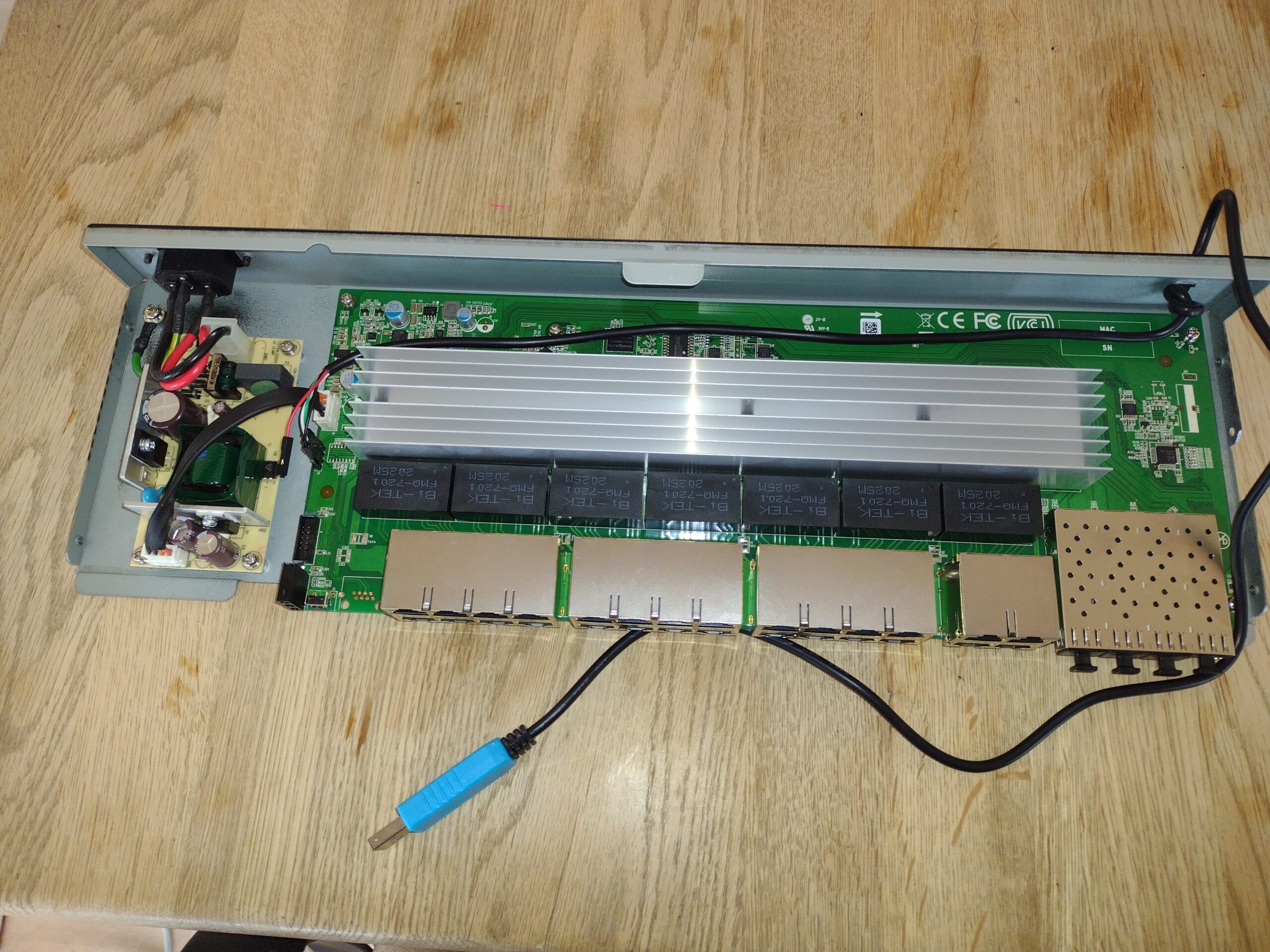
Next, I took the unit apart, soldered in a 4 pin header, connected a USB-serial adapter, and had a look at the output on the Serial Console
U-Boot 2011.12.(2.1.5.67086)-Candidate1 (Jun 22 2020 - 14:58:40)

Board: RTL838x CPU:500MHz LXB:200MHz MEM:300MHz
DRAM:  128 MB
SPI-F: 1x32 MB
Loading 1024B env. variables from offset 0x80000
Board Model = DGS-1210-28-F1 Cameo_bdinfo_get_BoardID [293]
Switch Model: RTL8382M_8218B_INTPHY_8218B_8214FC_DEMO (Port Count: 28)
Switch Chip: RTL8382
**************************************************
#### RTL8218B config - MAC ID = 0 ####
Now External 8218B
**************************************************
#### RTL8218B config - MAC ID = 8 ####
Now Internal PHY
**************************************************
#### RTL8218B config - MAC ID = 16 ####
Now External 8218B
**************************************************
**** RTL8214FC config - MAC ID = 24 ****
Now External 8214FC
Net:   Net Initialization Skipped
rtl8380#0
Hit Esc key to stop autoboot:  0

Loading Runtime Image .. ....
## Booting kernel from Legacy Image at b4e80000 ...
   Image Name:   OpenWrt
   Created:      2025-04-13  16:38:32 UTC
   Image Type:   MIPS Linux Kernel Image (gzip compressed)
   Data Size:    3644458 Bytes = 3.5 MB
   Load Address: 80100000
   Entry Point:  80100000
   Verifying Checksum ... Bad Data CRC
ERROR: can't get kernel image!
Kernel 2 failed !! Trying kernel 1 ...
## Booting kernel from Legacy Image at b4100000 ...
   Image Name:
   Created:      2020-06-22  15:09:40 UTC
   Image Type:   MIPS Linux Kernel Image (gzip compressed)
   Data Size:    1035510 Bytes = 1011.2 KB
   Load Address: 80000000
   Entry Point:  80262000
   Verifying Checksum ... OK
   Uncompressing Kernel Image ... OK

Starting kernel ...

Linux version 2.6.19 (simon@208Server) (gcc version 3.4.4 mipssde-6.03.00-20051020) #20 PREEMPT Mon Jun 22 15:09:26 CST 2020
CPU revision is: 00019070
Determined physical RAM map:
 memory: 02000000 @ 00000000 (usable)
User-defined physical RAM map:
 memory: 07a00000 @ 00000000 (usable)
Built 1 zonelists.  Total pages: 30988
Kernel command line: console=ttyS0,115200 mem=122M noinitrd root=/dev/mtdblock7 rw rootfstype=squashfs csb=0x0142C0E0 cso=0x00001045 csf=0x10CDD64A sfin=<NULL>,32MB,10887200;2071674
Primary instruction cache 16kB, physically tagged, 4-way, linesize 16 bytes.
Primary data cache 16kB, 2-way, linesize 16 bytes.
Synthesized TLB refill handler (20 instructions).
Synthesized TLB load handler fastpath (32 instructions).
Synthesized TLB store handler fastpath (32 instructions).
Synthesized TLB modify handler fastpath (31 instructions).
PID hash table entries: 512 (order: 9, 2048 bytes)
Dentry cache hash table entries: 16384 (order: 4, 65536 bytes)
Inode-cache hash table entries: 8192 (order: 3, 32768 bytes)
Memory: 121088k/124928k available (2015k kernel code, 3724k reserved, 421k data, 108k init, 0k highmem)
Mount-cache hash table entries: 512
Checking for 'wait' instruction...  available.
NET: Registered protocol family 16
NET: Registered protocol family 2
IP route cache hash table entries: 1024 (order: 0, 4096 bytes)
TCP established hash table entries: 4096 (order: 2, 16384 bytes)
TCP bind hash table entries: 2048 (order: 1, 8192 bytes)
TCP: Hash tables configured (established 4096 bind 2048)
TCP reno registered
squashfs: version 3.3 (2007/10/31) Phillip Lougher
JFFS2 version 2.2. (NAND) (C) 2001-2006 Red Hat, Inc.
io scheduler noop registered
io scheduler anticipatory registered
io scheduler deadline registered
io scheduler cfq registered (default)
Serial: 8250/16550 driver $Revision: 1.1.1.1 $ 1 ports, IRQ sharing disabled
serial8250: ttyS0 at MMIO 0x0 (irq = 31) is a 16550A
Probe: SPI CS1 Flash Type MX25L25635F
Creating 9 MTD partitions on "Total SPI FLASH":
0x00000000-0x00080000 : "BOOT"
0x00080000-0x000c0000 : "BDINFO"
0x000c0000-0x00100000 : "BDINFO2"
0x00100000-0x00280000 : "KERNEL1"
0x00280000-0x00e80000 : "ROOTFS1"
0x00e80000-0x01000000 : "KERNEL2"
0x01000000-0x01040000 : "SYSINFO"
0x01040000-0x01c40000 : "ROOTFS2"
0x01c40000-0x02000000 : "JFFS2"
IPv4 over IPv4 tunneling driver
TCP cubic registered
NET: Registered protocol family 1
NET: Registered protocol family 10
lo: Disabled Privacy Extensions
NET: Registered protocol family 17
No filesystem could mount root, tried:  squashfs
Kernel panic - not syncing: VFS: Unable to mount root fs on unknown-block(31,7)
 System restart.
What is going on ?
- The bootloader uBoot has found the OpenWrt image we have installed as Kernel-2, but there seems to be a bad Checksum; therefore, uBoot tries to boot Kernel-1, which fails because it cannot find the root filesystem.
I probably should have read OpenWrt.org: D-Link DGS-1210-16_g1 before I flashed the new firmware,
I installed it as Image-2 – My bad.
I did read OpenWrt.org DGS-1210-28-F2 which is the exact model and firmware version of my device, but it does not provide any relevant info. It would have been better if this WEB-page hadn’t existed, then I might have searched on and found the first mentioned page.
The device is bricked. The Rabbit hole just got deeper
When pressing Esc while booting i get uboot> prompt on the serial console, it does not respond to terminal input but keeps printing DPT Timeout, and I can see a BOOTP/DHCP request on the a computer connected to the switch with an Ethernet-cable. When pressing Ctrl-C I get a uboot> prompt. and it responds to terminal input, and I see the familiar uBoot environment, now I just have to figure out how to get new firmware installed from here.
All that is left to do to get back on track is to follow the section
in the OpenWrt.org: D-Link DGS-1210-16_g1 guide
That is it, I am now the happy owner a 28 port Managed Gigabit Ethernet switch running the newest version of OpenWrt, an afternoon was all it took. If I had read the right guide from the beginning it would have taken less than an hour.
Only half a victory
The other D-Link DGS-1210-24 switch is an earlier design, which uses a Kirkwood ARM processor, and although D-link has made the source-code available, and OpenWrt do have an article about this version, I cannot find the OpenWrt firmware for it, so it will have to run the original firmware for now.
]]>
Links:
-
- Mit indlæg: Smart Wifi Switch – Tasmota på Sonoff Basic
- GitHub: arendst/Tasmota
- Tasmota.GitHub.io: Sonoff Mini Extreme Switch Module (MINIR4)
- input connections and +5v, GND connections for flashing
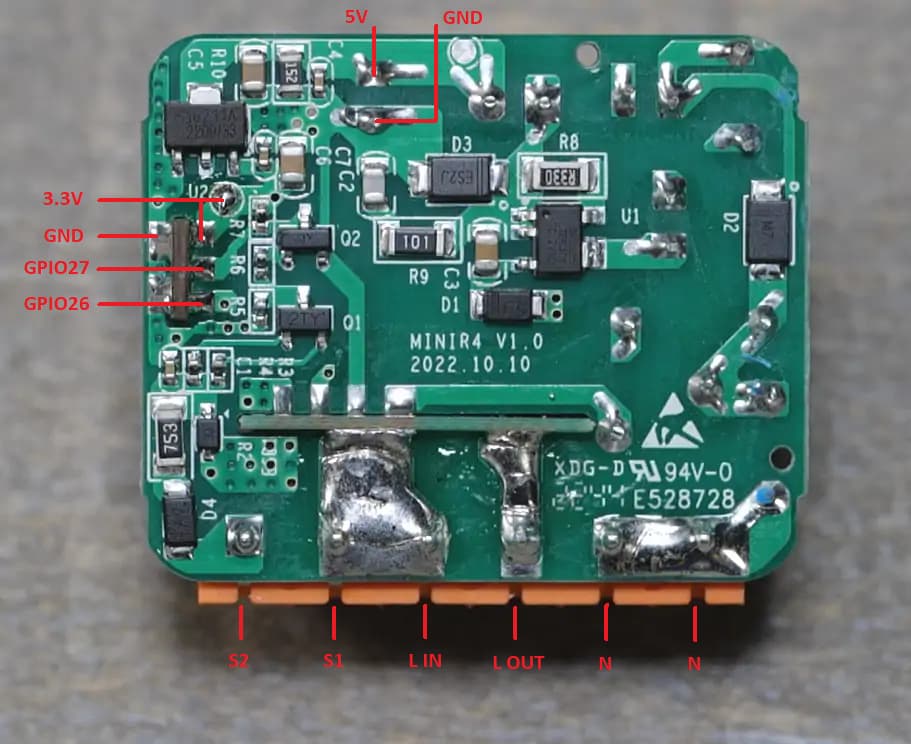
Der en RX og TX lodde-øer på Wifi-printet, GND og +5v forbinder jeg som vist her. Jeg bruger blot en almindelig USB-rs232 hvor jeg tager 5v direkte fra USB.
Dimsen skal bootes i programming mode, tryk-på-knap mens USB kabel sættes i computer (gpio-0 til GND). Der efter kører jeg en Makefile som, checker, læser, flasher og konfigurere dimsen mens den er koblet op serielt. Reelt er det disse kommandoer der udføres, det er ikke fordi jeg ikke vil dele min Makefile, men den mest min dokumentation over hvile kommandoer der skal til.
- Check forbindelse og cpu type:
$ esptool.py -p /dev/ttyUSB0 read_mac
esptool.py v4.8.1
Serial port /dev/ttyUSB0
Connecting.....
Detecting chip type... Unsupported detection protocol, switching and trying again...
Connecting...
Detecting chip type... ESP32
Chip is ESP32-D0WD-V3 (revision v3.1)
Features: WiFi, BT, Dual Core, 240MHz, VRef calibration in efuse, Coding Scheme None
Crystal is 40MHz
MAC: a8:42:e3:9c:80:c4
Uploading stub...
Running stub...
Stub running...
MAC: a8:42:e3:9c:80:c4
Hard resetting via RTS pin...
- Check flash størrelse:
$ esptool.py -p /dev/ttyUSB0 flash_id
esptool.py v4.8.1
Serial port /dev/ttyUSB0
Connecting...
Detecting chip type... Unsupported detection protocol, switching and trying again...
Connecting...
Detecting chip type... ESP32
Chip is ESP32-D0WD-V3 (revision v3.1)
Features: WiFi, BT, Dual Core, 240MHz, VRef calibration in efuse, Coding Scheme None
Crystal is 40MHz
MAC: a8:42:e3:9c:80:c4
Stub is already running. No upload is necessary.
Manufacturer: c8
Device: 4016
Detected flash size: 4MB
Flash voltage set by a strapping pin to 3.3V
Hard resetting via RTS pin...
- Backup af den firmware der er installeret nu:
$ esptool.py --port /dev/ttyUSB0 read_flash 0x00000 0x100000 sonoff-dualr3l-orig.bin
- Download Tasmota firmware:
$ wget https://ota.tasmota.com/tasmota32/tasmota32.factory.bin
- Slet nuværende firmware:
$ esptool.py --port /dev/ttyUSB0 erase_flash
- Upload den nye firmware:
$ esptool.py --port /dev/ttyUSB0 --chip esp32 --baud 921600 --before default_reset --after hard_reset write_flash -z --flash_mode dout --flash_freq 40m --flash_size detect 0x00000 tasmota32.factory.bin
Hvis ellers der er strøm nok skulle dimsen kunne configures via rs232, Jeg har en Makefile som bl.a sætter Wifi forbindelsen op. Derefter kan dimsen konfigures via dens WEB-server, og efter at template er sat op til
{"NAME":"Sonoff MINIR4","GPIO":[32,0,0,0,0,0,0,0,0,0,0,0,0,0,0,576,0,0,0,0,0,0,224,160,0,0,0,0,0,0,0,0,0,0,0,0],"FLAG":0,"BASE":1}Burde dimsen nu være fuld funktionel.
Både denne og Sonoff Dual-R3 har mulighed for at blive styret af LK-NES ringe-tryk der momentant forbinder S2 til L (fasen), dvs mange-vej korrospondance klares med bare en ekstra ledning.
I Tasmota kan man sætte “PulseTime1” til f.ex. 3700 hvilket vil slukke lyset efter 1 time
- t<100: t/10 sekunder
- t>110 t-100 sekunder
Åben console på Tasmota enheden og tast:
pulsetime1 3700
Man kan checke det nuværende værdi med:
pulsetime1]]>
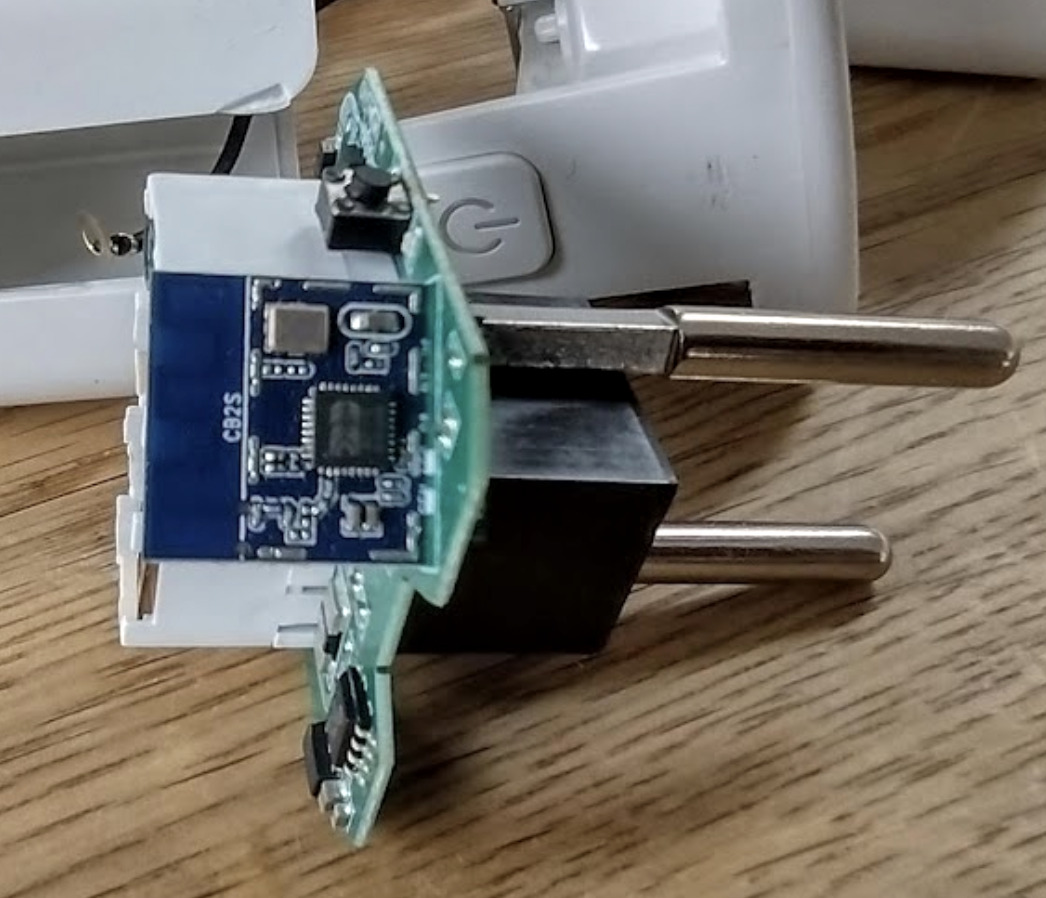
Tuya Wifi Power Monitoring Smart Plug
The easiest would be to replace the firmware OTA (over the air). Otherwise, I would have to open the devices, solder wires to them, and flash a new open-source firmware onto them. Once the device is liberated, OTA firmware updates should be possible.
The plug contains a small Wifi-module which is marked CB2S and e524923, Unfortunately, these are NOT based on ESP devices so Tasmota cannot be installed.
A little googlin gave this:
- Youtube: Tuya WiFi Smart Plug – How to disassemble
- smartnydom.pl Forum: based on BK7231N chip, not ESP8266
- on the above forum it says the wifi-plug accepts esphome or openBK via tuya-cloudcutter without disassembly.
- Elektroda topic 4040624 [BK7231N/CB2S/BL0937] Wifi Smart Plug with Energy Measurement (RMC021)
- Elektroda topic 4016515 Exploring the Ultra-Affordable 4€ Smart Plug from AliExpress: A Deep Dive
- Elektroda topic 3887748 Tuya LSPA9 smart socket – teardown, OpenBeken flashing guide for CB2S, BL0942
- Schematic: elivco lspa9
- Datasheet: CB2S module
- Github: libretiny-eu/libretiny
- Github: openshwprojects/OpenBK7231T_App
- Github: arendst/Tasmota/discussions/17173 suggest to replace the CB2S/BK7231N with a TYWE2S/ESP-02S module to run tasmota.
Tuya Cloudcutter – install OpenSource firmware OTA
- Youtube: Tuya-Cloudcutter & ESPHome: How-To Guide w/ Home Assistant
- Github: Tuya-cloutcutter disconnects Tuya IoT devices from the cloud,
- How To Guide – Tuya CloudCutter with ESPHome LibreTiny
I followed the above guide, but unfortunately, I was not able to install new firmware OTA. I should make tuya-cloudcutter work on this device too, but I don’t even know where to start. I should probably start by reading:
- Elektroda topic 4021129 Extracting DpIDs for TUYA MCU devices
This will have to be a future rabbit hole.
If the Software is broken give it some Hardware
If I need to physically open up the devices to flash firmware using wires, I might just as well replace the WIFI-module with an ESP based version, and install Tasmota, which is what I use on most of my IoT modules.
I have ordered TYWE2S/ESP-02S on Aliexpress, $2.18 delivered, but I have seen them as cheap as $1.19 plus shipping, which will turn out cheaper if you order a number of modules. If this will work, the power monitoring smart plug would end up costing me $6.49 or 45 Danish-kr, and I would have some BK7231 SoC to play with, the rabbit hole will be waiting for me.
Next time I will install the new Brain and Install Tasmota
]]>
Screenshot
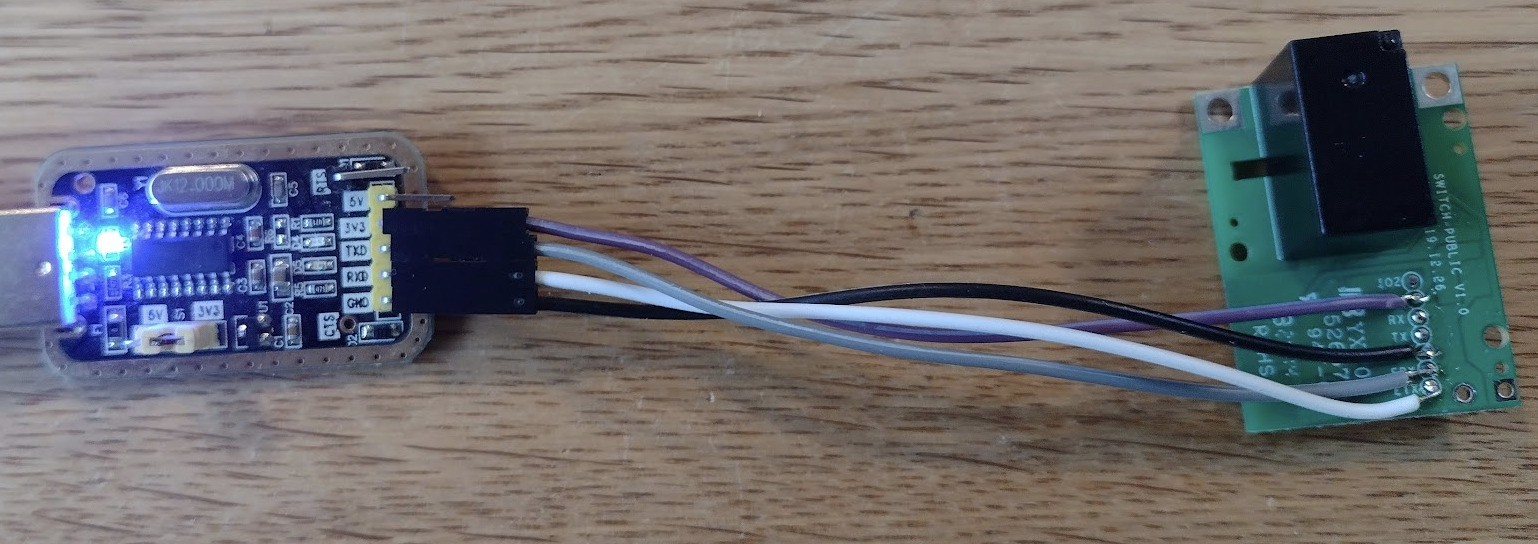
Hvordan jeg installerer Tasmota på Sonoff RE5V1C, en 5v wifi switch.
Se også
- Mit indlæg: Smart Wifi Switch – Tasmota på Sonoff Basic
- GitHub: arendst/Tasmota
- Tasmota.GitHub.io: Sonoff RE5V1C 5V Inching/Selflock Relay Board
Tasmota firmware installeres på Dimsen via RS232, Dimsen skal bootes i programming mode, tryk-på-knap mens USB kabel sættes i computer (gpio-0 til GND). Derefter udfører jeg disse komandoer
- Check forbindelse og cpu type:
$ esptool.py -p /dev/ttyUSB0 read_mac
esptool.py v4.8.1
Serial port /dev/ttyUSB0
Connecting....
Detecting chip type... Unsupported detection protocol, switching and trying again...
Connecting...
Detecting chip type... ESP8266
Chip is ESP8285N08
Features: WiFi, Embedded Flash
Crystal is 26MHz
MAC: ec:94:cb:9d:40:49
Uploading stub...
Running stub...
Stub running...
MAC: ec:94:cb:9d:40:49
Hard resetting via RTS pin...
- ESP8285N08 har indbygget 1Mb Flash så der er ingen grund til at checke flash størrelse
- Backup af den firmware der er installeret nu:
$ esptool.py --port /dev/ttyUSB0 read_flash 0x00000 0x100000 sonoff-res5v1c-orig.bin
- Download Tasmota firmware:
$ wget https://ota.tasmota.com/tasmota/tasmota.bin
- Slet nuværende firmware:
$ esptool.py --port /dev/ttyUSB0 erase_flash
- Upload den nye firmware:
$ esptool.py --port /dev/ttyUSB0 write_flash -fs 1MB -fm dout 0x0 tasmota.bin
Nu kører Dimsen Tasmota, davi nu alligevel har rs232 adgang til dimsen så lad os sætte den op v.hj.a serielle kommanoder og dermed undgår vi at skulle gøre ovenstående. Her ern oversigt over kommandoer.
$ picocom -l /dev/ttyUSB0 -b 115200 --omap crcrlf --echo --quiet

template {"NAME":"Sonoff RE5V1C","GPIO":[17,255,255,255,255,255,0,0,21,56,0,0,0],"FLAG":0,"BASE":18}

backlog ssid1 Wiot; password1 mit hemmelige password; mqtthost 192.168.x.y;
Nu burde tingesten være på nettet, man kan checke om alt gik vel i terminalen og se hvad navn og ip-addresse den har, og vi kan nu åbne den inbyggede WEB-server i en browser, og hvis man ikke har lukket ned for picocom kan man følge consol outputtet der.
Det var det hele
]]>
Screenshot
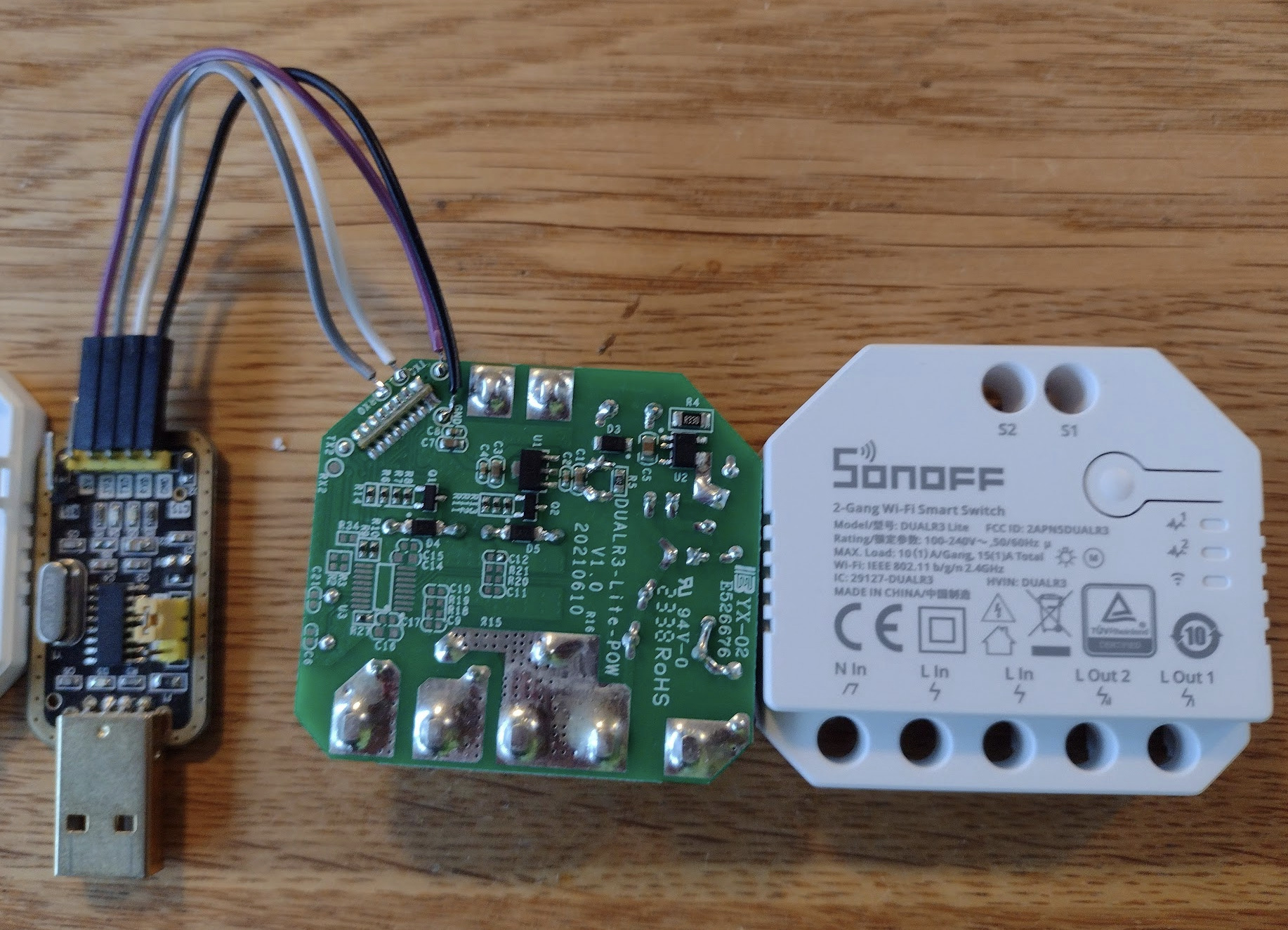
Hvordan jeg installerer Tasmota på Sonoff Dual R3 Lite, der fås for omkring 100kr på f.ex. Amazon.de
Se også
- Mit indlæg: Smart Wifi Switch – Tasmota på Sonoff Basic
- GitHub: arendst/Tasmota
- Tasmota.GitHub.io: Sonoff-Dual
- templates.blakadder.com: sonoff_DUALR3L
Tasmota firmware installeres på Dimsen via RS232, Dimsen skal bootes i programming mode, tryk-på-knap mens USB kabel sættes i computer (gpio-0 til GND). Derefter udfører jeg disse komandoer
- Check forbindelse og cpu type:
$ esptool.py -p /dev/ttyUSB0 read_mac
esptool.py v4.8.1
Serial port /dev/ttyUSB0
Connecting.....
Detecting chip type... Unsupported detection protocol, switching and trying again...
Connecting...
Detecting chip type... ESP32
Chip is ESP32-D0WD-V3 (revision v3.1)
Features: WiFi, BT, Dual Core, 240MHz, VRef calibration in efuse, Coding Scheme None
Crystal is 40MHz
MAC: a8:42:e3:9c:80:c4
Uploading stub...
Running stub...
Stub running...
MAC: a8:42:e3:9c:80:c4
Hard resetting via RTS pin...
- Check flash størrelse:
$ esptool.py -p /dev/ttyUSB0 flash_id
esptool.py v4.8.1
Serial port /dev/ttyUSB0
Connecting...
Detecting chip type... Unsupported detection protocol, switching and trying again...
Connecting...
Detecting chip type... ESP32
Chip is ESP32-D0WD-V3 (revision v3.1)
Features: WiFi, BT, Dual Core, 240MHz, VRef calibration in efuse, Coding Scheme None
Crystal is 40MHz
MAC: a8:42:e3:9c:80:c4
Stub is already running. No upload is necessary.
Manufacturer: c8
Device: 4016
Detected flash size: 4MB
Flash voltage set by a strapping pin to 3.3V
Hard resetting via RTS pin...
- Backup af den firmware der er installeret nu:
$ esptool.py --port /dev/ttyUSB0 read_flash 0x00000 0x100000 sonoff-dualr3l-orig.bin
- Download Tasmota firmware:
$ wget https://ota.tasmota.com/tasmota32/tasmota32.factory.bin
- Slet nuværende firmware:
$ esptool.py --port /dev/ttyUSB0 erase_flash
- Upload den nye firmware:
$ esptool.py --port /dev/ttyUSB0 --chip esp32 --baud 921600 --before default_reset --after hard_reset write_flash -z --flash_mode dout --flash_freq 40m --flash_size detect 0x00000 tasmota32.factory.bin
Det var det, nu kører Dimsen Tasmota, Det ville have være rart om vi kunne konfigurere Wifi og Mqtt, nu vi alligevel har rs232 adgang, men ifølge
er der ikke strøm nok, så resten af opsætningen må foregå med enheden forbundet til 220v via WiFi og WEB-browser.
- fjern testledninger vi loddede på
- koble enheden op til lysnettet
- på telefon/comnputer forbind til Wifi Accesspoint “tasmota-9C80C4-0196“
- Configuration -> Configure Wifi: Sæt SSID, Password og hostname
- Configuration -> Configure Other: Sæt Template:
{"NAME":"Sonoff Dual R3 Lite","GPIO":[34,0,0,0,0,0,0,0,0,576,225,0,0,0,0,0,0,0,0,0,0,0,0,224,0,0,0,0,32,33,0,0,0,0,0,0],"FLAG":0,"BASE":1}Activate, Save
Ovenstående konfigurere 2 (3) buttons, 2 relæer og LED-en - Configuration -> Configure MQTT: Sæt Host 192.169.x.y, Topic sw_dualr3l-1
- power cycle enheden
Nu burde dimsen optræde på nettet som:
- http://sw-dualr3l-1
Det var det hele
]]>Jeg kan varmt anbefale at bruge en lille time på at se:
Den er på tysk, men der er mulighed for undertekster – bestemt værd at se
— Det er fandme uhyggeligt du —
Der er masser af links/videoer om hvordan man installerer sin egen software på sin El-pære.
Der er to uafhængige projekter der tilbyder fuld kontrol over firmware, værktøjer og firmwaren kan downloades fra nettet.
- Tasmota der kun supporterer esp8266 og esp32, er i princippet en firmware der indeholder al funtionalitet, for alt, og det er den samme software i alle IOT-er, man enabler så det man skal bruge, dermed kan man ændre funktion uden at skulle installere ny firmware. Det er det system vore celler bruger, de har den fulde opskrift på bygge et menneske, alle procedurer er gemt i DNA. De her dimser kommer med mindst 1Mb kode-plads, så den kan jo ligeså godt udnyttes, men efterhånden er der fundet på så meget funktionalitet at der ikke plads til alt i de mindste enheder, så der er flere versioner.
- ESPHome compilerer kun den kode ind som der er behov for. og man kan tilføje selvskrevet programmel hvis man har de tilbøjeligheder, ESPHome supporterer også andre end ESP chips, så det er nok den jeg burde vælge.
Andreas Spiess har en video hvor han sammeligner dem:
Heldigvis så kan man skifte firmware OTA (over The Air) fra den ene til den anden. Det er kun første gang når man skal befri dimsen for dens originale firmware at man skal uploade firmware via RS232.
Jeg har valgt at bruge Tasmota i første omgang.
Sonoff Basic
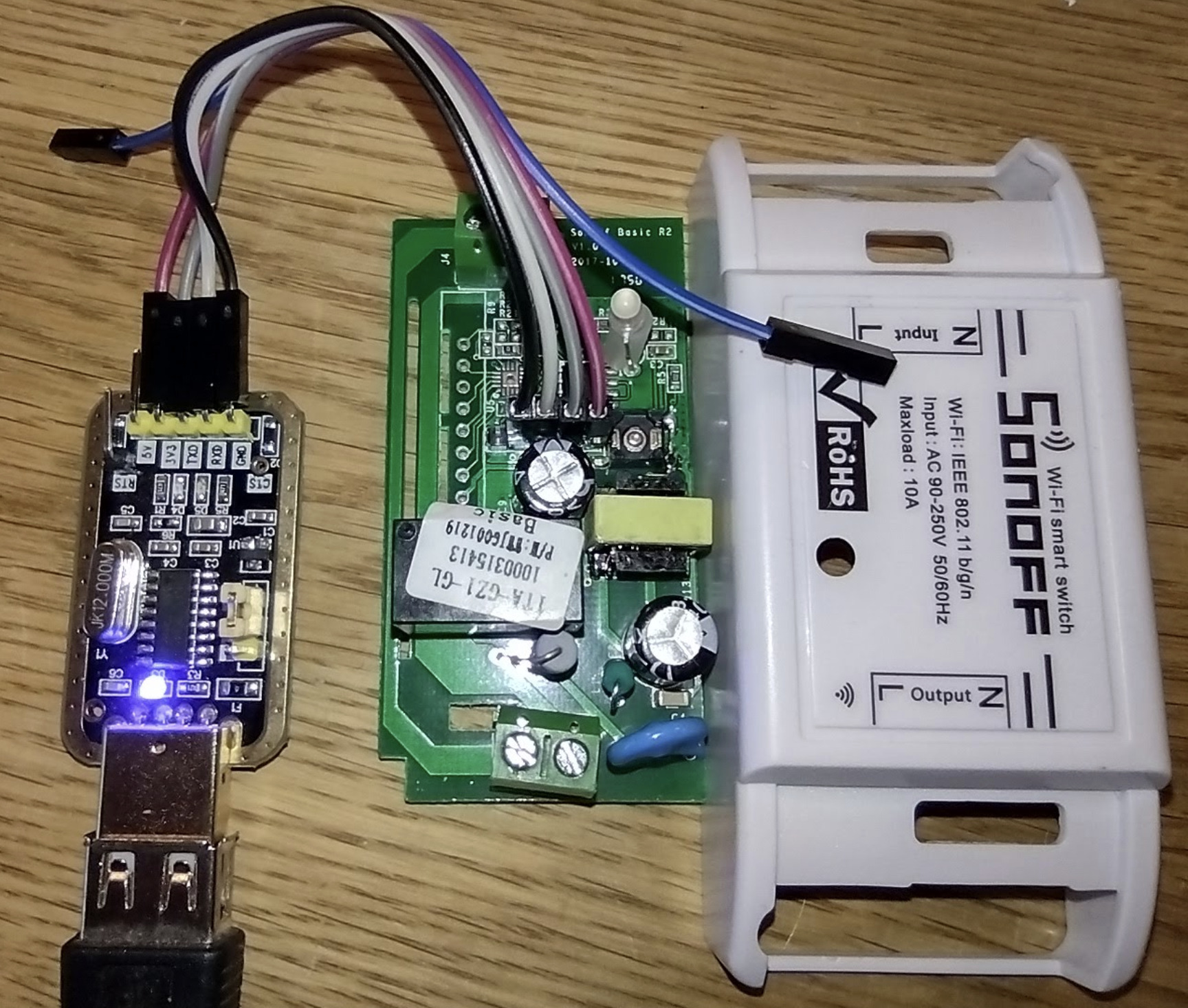
rs232 flash mode, button pressed/shorted, (gpio-0 low)
Min første Wifi kontrollerede kontakt er fra 2017, den er både FCC og CE registreret, og stadig fuld på højde med hvad man har idag, selvom man dengang ikke havde grejet hvordan man elegant kunne håndtere lokal-tænd-sluk knapper, og så er den i forhold til dagens standard lidt bulky.
- YouTube: The COMPLETE Guide to Tasmota 2019
- Instructable: Use Homie Firmware to Drive Sonoff Switch Module (ESP8266 Based)
- tasmota.github.io: Getting-Started
- tasmota.github.io: Sonoff-Basic
- How to flash Tasmota on a Sonoff R2 device
- Sonoff Basic Diagram
Dimsen skal bootes i programming mode, (gpio-0 til GND), tryk-på-knap mens USB kabel sættes i computer.
Check forbindelse
$ esptool.py -p /dev/ttyUSB0 read_mac
esptool.py v4.8.1
Serial port /dev/ttyUSB0
Connecting....
Detecting chip type... Unsupported detection protocol, switching and trying again...
Connecting...
Detecting chip type... ESP8266
Chip is ESP8266EX
Features: WiFi
Crystal is 26MHz
MAC: 68:c6:3a:a3:3c:a7
Uploading stub...
Running stub...
Stub running...
MAC: 68:c6:3a:a3:3c:a7
Hard resetting via RTS pin...
Get ID
$ esptool.py -p /dev/ttyUSB0 flash_id
esptool.py v4.8.1
Serial port /dev/ttyUSB0
Connecting...
Detecting chip type... Unsupported detection protocol, switching and trying again...
Connecting...
Detecting chip type... ESP8266
Chip is ESP8266EX
Features: WiFi
Crystal is 26MHz
MAC: 68:c6:3a:a3:3c:a7
Stub is already running. No upload is necessary.
Manufacturer: 5e
Device: 4014
Detected flash size: 1MB
Hard resetting via RTS pin...
Backup af firmware der er installeret nu
$ esptool.py --port /dev/ttyUSB0 read_flash 0x00000 0x100000 sonoff-r2-orig.bin
esptool.py v4.8.1
Serial port /dev/ttyUSB0
Connecting...
Detecting chip type... Unsupported detection protocol, switching and trying again...
Connecting...
Detecting chip type... ESP8266
Chip is ESP8266EX
Features: WiFi
Crystal is 26MHz
MAC: 68:c6:3a:a3:3c:a7
Stub is already running. No upload is necessary.
Configuring flash size...
1048576 (100 %)
1048576 (100 %)
Read 1048576 bytes at 0x00000000 in 94.8 seconds (88.4 kbit/s)...
Hard resetting via RTS pin...
Download Tasmota firmware
$ wget https://ota.tasmota.com/tasmota/tasmota.bin
--2024-10-23 13:48:40--  https://ota.tasmota.com/tasmota/tasmota.bin
Resolving ota.tasmota.com (ota.tasmota.com)... 18.173.5.34, 18.173.5.54, 18.173.5.61, ...
Connecting to ota.tasmota.com (ota.tasmota.com)|18.173.5.34|:443... connected.
HTTP request sent, awaiting response... 200 OK
Length: 665568 (650K) [application/octet-stream]
Saving to: ‘tasmota.bin’

tasmota.bin                100%[========================================>] 649.97K  --.-KB/s    in 0.08s

2024-10-23 13:48:41 (7.85 MB/s) - ‘tasmota.bin’ saved [665568/665568]
Erase
$ esptool.py --port /dev/ttyUSB0 erase_flash
esptool.py v4.8.1
Serial port /dev/ttyUSB0
Connecting...
Detecting chip type... Unsupported detection protocol, switching and trying again...
Connecting...
Detecting chip type... ESP8266
Chip is ESP8266EX
Features: WiFi
Crystal is 26MHz
MAC: 68:c6:3a:a3:3c:a7
Stub is already running. No upload is necessary.
Erasing flash (this may take a while)...
Chip erase completed successfully in 3.1s
Hard resetting via RTS pin...
Upload den nye firmware
$ esptool.py --port /dev/ttyUSB0 write_flash -fs 1MB -fm dout 0x0 tasmota.bin
esptool.py v4.8.1
Serial port /dev/ttyUSB0
Connecting...
Detecting chip type... Unsupported detection protocol, switching and trying again...
Connecting...
Detecting chip type... ESP8266
Chip is ESP8266EX
Features: WiFi
Crystal is 26MHz
MAC: 68:c6:3a:a3:3c:a7
Stub is already running. No upload is necessary.
Configuring flash size...
Flash will be erased from 0x00000000 to 0x000a2fff...
Compressed 665568 bytes to 475457...
Wrote 665568 bytes (475457 compressed) at 0x00000000 in 43.2 seconds (effective 123.1 kbit/s)...
Hash of data verified.

Leaving...
Hard resetting via RTS pin...
Det var det, hvis du havde lodet gpio-0 til GND, så fjern den og dimsen vil boote i normal mode, ellers lad være med trykke på knappen mens den booter.
Nu kører Dimsen Tasmota, og resten kunne foregå ved at konfigure Dimsen via dens WEB-interface. Først vil enheden optræde som:
- accesspoint tasmota-A33CA7-7335
- Forbind en computer/telefon til dette net
- Configurer Dimsen som beskrevet i en af linkene ovenfor, dvs åbn http://192.168.4.1
Men siden vi nu alligevel har rs232 adgang til dimsen så lad os sætte den op v.hj.a serielle kommanoder og dermed undgår vi at skulle gøre ovenstående.
- Oversigt over kommandoerne der både kan bruges via seriel og via Web/Mqtt
Når man tænder Dimsen, blinker den grøn. Så vi forbinder os til den med picocom udfører kommandoerne reset 1 og status, og trykker på knappen et par gange:
$ picocom -l /dev/ttyUSB0 -b 115200 --omap crcrlf --echo --quiet

reset 1
00:00:32.139 CMD: reset 1
00:00:32.143 RSL: RESULT = {"Reset":"Reset and Restarting"}
00:00:32.593 CFG: Use defaults
00:00:34.845 APP: Restarting

 ets Jan  8 2013,rst cause:1, boot mode:(3,6)

load 0x4010f000, len 3584, room 16
tail 0
chksum 0xb0
csum 0xb0
v3969889e
~ld

00:00:00.001 HDW: ESP8266EX
00:00:00.023 CFG: Loaded from flash at FB, Count 1
00:00:00.028 QPC: Count 1
00:00:00.040 Project tasmota - Tasmota Version 14.3.0(release-tasmota)-2_7_7(2024-10-15T08:18:01)
00:00:00.304 WIF: WifiManager active for 3 minutes
00:00:00.812 HTP: Web server active on tasmota-A33CA7-7335 with IP address 192.168.4.1
00:00:06.942 QPC: Reset
status
00:00:30.712 CMD: status
00:00:30.718 RSL: STATUS = {"Status":{"Module":1,"DeviceName":"Tasmota","FriendlyName":["Tasmota"],"Topic":"tasmota_A33CA7","ButtonTopic":"0","Power":"0","PowerLock":"0","PowerOnState":3,"LedState":1,"LedMask":"FFFF","SaveData":1,"SaveState":1,"SwitchTopic":"0","SwitchMode":[0,0,0,0,0,0,0,0,0,0,0,0,0,0,0,0,0,0,0,0,0,0,0,0,0,0,0,0],"ButtonRetain":0,"SwitchRetain":0,"SensorRetain":0,"PowerRetain":0,"InfoRetain":0,"StateRetain":0,"StatusRetain":0}}
00:04:22.563 RSL: RESULT = {"POWER":"ON"}
00:04:22.564 RSL: POWER = ON
00:04:25.821 RSL: RESULT = {"POWER":"OFF"}
00:04:25.823 RSL: POWER = OFF
Efter første tryk er lysdioden konstant grøn, efter næste tryk blinker den igen. Nu kan vi konfigurere de basale ting, nemlig template, wifi access og mqtt. Herefter skulle den være klar til at blive sat i drift, her er de ting jeg sætter.
template {"NAME":"Sonoff Basic","GPIO":[17,255,0,255,0,0,0,0,21,56,255,0,0],"FLAG":0,"BASE":1}

backlog ssid1 Wiot; password1 mit hemmelige password

mqtthost 192.168.100.2.
Nu burde tingesten være på nettet, man kan checke om alt gik vel i terminalen og se hvad navn og ip-addresse den har, og vi kan nu åbne den inbyggede WB=server i en browser:

- http://tasmota-A33CA7-7335
Dimsen kan nu tænde og slukkes med et tryk på en WEB-side, og yderligere configureringer er lige til.
Normalt vil man jo bruge et eller anden Home Automation system f.ex. Home Assistant, Det behøver ikke være avanceret, men det er nu smart at man slukke alle lys i kælderen når man går i seng – fra sin seng, eller automatisk kl. 23:00, mere om det en anden gang.
]]>In 2008 we started using Google Apps for Your Domain, handling storepeter.dk and lorenzen.us
In 2016 Google Apps was renamed to G-Suite, but it was the same thing, maybe some more apps, our primary use was: Gmail, Calendar, and Grand-Central/Voice.
Now in 2022 G-Suite is being renamed Google Workspace and it will no longer be a free service. We are very grateful for our 14 years together. We have had a free mail and calendar and home-phone service, while Google has been able to grow this into a business. It is just natural that Google tries to cash in, after all, its mission is to make money for its shareholders.
Google Workspace costs $6/user/month, which is too steep for our little family (we do have more e-mail addresses than most families). Of course, Google does this to get some income from the many small businesses that have set up a service like ours and want to brag about having their own domain name.
G Suite legacy free edition
6 days before the June 1st 2022 deadline Google send out an E-mail:
- [Action Required] Upgrade your G Suite legacy free edition subscriptions to Google Workspace by June 27, 2022
With this happy message deep inside the e-mail:
If you’re an individual or family using your account for
non-commercial purposes, you can continue using
the G Suite legacy free edition and opt out of the transition

to Workspace in the Google Admin console before June 27, 2022.
It seems that Google have done the right thing and found a solution for us and other early adapters who have used G-suite since before 2012. G Suite legacy free edition Thank You Google.
So this whole exercise is no longer necessary for us.
Had Google introduced a service with a more modest price tag ($10/family/month) I am sure we would have accepted it. Now we will end up sending our money to Simply.com which offers something like that in that price range. We could migrate to their webmail service too, but we are used to Gmail so let’s see if we can set up a system where we can keep both using Gmail and using our domain names.
Before 2008 I was running my own mail server, and I have been running my own WEB-servers for more than 25 years, I still do, although this is probably going to change too.
Basically what Google says is that you can continue having a free Gmail service if you give up your own domain, in my case, this would mean that peter@lorenzen.us would be replaced by something like peter.lorenzen.us@gmail.com. Kind of fair you get free e-mail and advertise a little for Gmail each time you use it.
BUT – let us see if we can keep @lorenzen.us addresses and still be able to use the familiar Gmail.
The plan here is to have Gmail.com handle our E-mail much as before but with new @gmail .com addresses. As Mail and WEB-servers we will use Simply.com which is a Danish company. Hence the Lorenzen’s will use Gmail, while Simply.com will work as an E-mail Gateway/Relay, and that is what the rest of the world will see.
- Simply.com receives all mail to storepeter.dk and lorenzen.us and forwards it immediately to Gmail.com
- The Lorenzen’s use Gmail.com and when they send an E-mail it is forwarded through Simply.com mail server.
Simply.com as mail server
 When you order a WEB-hotel with Simply.com you also get a e-mail-service. We setup an E-mail account for all the users on our domains. These E-mail accounts are not used by our users, they are only used to forward mail to the gmail.com mailserver and to send-out e-mail in the name of @lorenzen.us or @storepeter.dk on behalf of the gmail server. For each Webmail a forward of mail has to be setup, see the above screen-shot.
- webmail -> Settings -> Filters -> redirect message to username@gmail.com
- webmail -> Settings -> Identities -> Full Name <username@storepeter.dk>
- webmail -> Settings -> Identities -> Full Name <username@lorenzen.us>
On Simply.com storepeter.dk is the main domain, while lorenzen.us is just an alias for storepeter.dk hence E-mail to peter@lorenzen.us will end up at peter@storepeter.dk which then again is forwarded to my gmail-account. Also the lorenzen.us WEB-pages are just aliases for the storepeter.dk WEB-pages, but people passing by our WEB-sites should not notice any of this.
Let Gmail send mail as @storepeter.dk or @lorenzen.us
 |
 |
 |
- Login as as user@gmail.com
- Settings -> See all settings
- Settings -> Accounts and import
- – see above left screenshot
- Settings -> Accounts and import -> Send mail as – Add another email address
- – see above middle screenshot
- Add another email address -> Name: User-Name
- Add another email address ->Email-address: user@lorenzen.us
- Add another email address -> Next Step
- – see above right screenshot
- Add another email address -> SMTP Server: smtp.simply.com
- Add another email address ->Username: user@storepeter.dk
- Add another email address ->Password: very-secret-user-email-password
- Add another email address -> Add Account
Let Gmail poll simply.com every 30 minutes
In theory, this step should not be necessary since we forward all mail to simply.com on arrival, but it seems the forward functionality on the simply.com mail-server does not really work, I do not why, are the forward rejected by the gmail.com account or is never sent by simply.com.
But it seems to be necessary, just follow this recipe Simply.com: Setting up mail through Gmail
That should be it:
]]>
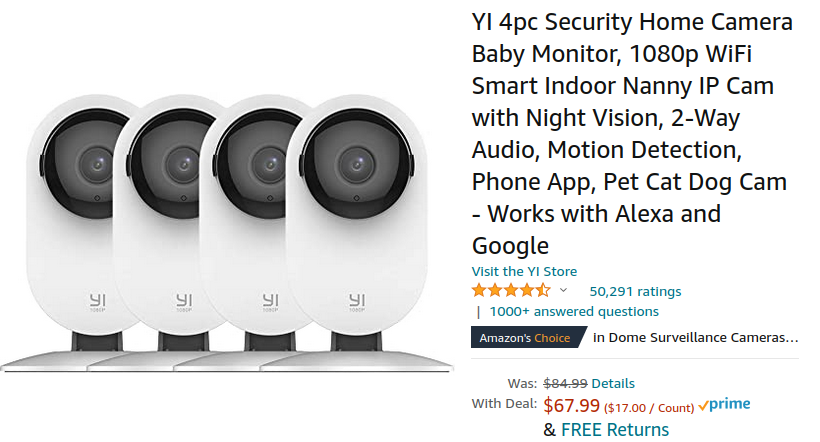 I bought the cheapest Wifi camera on Amazon
- 4 WiFi 1080p indendørs ip-camera $17 each delivered
as far as I understand, the intention is to install an app on your phone, and via their app and their WEB server you can then use the camera. There is plenty of opportunity to commit to a YI solution where you pay close to the camera’s price per month in subscription. – That’s by no means what I want.
Fortunately, I can change the firmware so it can spit an RTSP stream out on my local network that our server can use, the software is on Github: roleoroleo/yi-hack-Allwinner-v2
First install attemp – SUCCESS we can watch a RTSP stream
Here is the recipe for how I changed the firmware, see also the link above:
- check serial number as described on Github mine is IFUS… so we found the right one
- configurer the IP-Camera via YI-Home-App, note: phone and ip camera should be on 2.4 Ghz Wifi
- insert SD-card in camera, format SD-card via YI-Home-App
- power off IP camera, move SD-card to a linux box and install backup.tar.gz from Dump your backup firmware (SD card)
- move SD-card back to IP-camera and power on – a backup of the original fir mware will be made (the script SD-card/Factory/config.sh is executed on boot-up.
- onGitHup shoose the newst tag (was 0.1.8)
- from Release download y211ga_0.1.8.tgz whhich is the Firmware version of my cameraet
- install y211ga_01.8.tgz on SD-card
- move SD-card to IP-cameraet, reboot and the new firmware is installed ( by executing SD-card/Factory/config.sh)
- HURRAH th cameraet belongs to me and is under my control
- check http://camera-ip:8080
- try vlc rtsp://camera-ip/ch0_0.h264 we see a livevideo feed – delayed a little
- try ssh root@camera-ip
- No more YI-Home-App for me
I am impressed, for $20 (incl sdcard) I got a nice 1080p wifi-camera, that can provide an RTSP stream.
Iron out some bugs
On the status page, most of the fields are empty. lets fix that
When I ssh into the camera and execute stautus.json I get:
root@yi-cam1:~#  /tmp/sd/yi-hack/www/cgi-bin/status.json
Content-type: application/json

/tmp/sd/yi-hack/www/cgi-bin/status.json: line 6: hostname: not found
/tmp/sd/yi-hack/www/cgi-bin/status.json: line 23: free: not found
/tmp/sd/yi-hack/www/cgi-bin/status.json: line 24: free: not found
{
"name":"yi-hack-allwinner-v2",
"hostname":"",
"fw_version":"0.1.8",
"home_version":"9.0.36.00_202011101611",
"model_suffix":"y211ga",
"ptz":"no",
"serial_number":"


FFFFFFFFFFFFFFFF",
"local_time":"Mon Aug 23 14:14:53 GMT 2021",
"uptime":"18924.75",
"load_avg":"1.97 1.83 1.77",
"total_memory":"",
"free_memory":"",
"free_sd":"88%",
"local_ip":"192.168.2.162",
"netmask":"255.255.255.0",
"gateway":"192.168.2.1",
"mac_addr":"84:7A:B6:60:70:92",
"wlan_essid":"Wi2-ve",
"wlan_strength":"50"
}root@yi-cam1:~#
Two commands not available, but the real culpritt here is the Serial number, Here are the changes to get this right:
diff -Naur yi-hack/www/cgi-bin/status.json status.json
--- yi-hack/www/cgi-bin/status.json	2021-06-17 16:35:43.000000000 -0400
+++ status.json	2021-08-23 10:46:00.432358750 -0400
@@ -3,7 +3,7 @@
 printf "Content-type: application/json\r\n\r\n"

 NAME="yi-hack-allwinner-v2"
-HOSTNAME=$(hostname)
+HOSTNAME=$(cat /tmp/sd/yi-hack/etc/hostname)
 FW_VERSION=$(cat /tmp/sd/yi-hack/version)
 HOME_VERSION=$(cat /home/app/.appver)
 MODEL_SUFFIX=$(cat /tmp/sd/yi-hack/model_suffix)
@@ -12,7 +12,7 @@
 else
     PTZ="no"
 fi
-if [ "$MODEL_SUFFIX" == "y211ga" ] || [ "$MODEL_SUFFIX" == "h60ga" ]; then
+if [ "$MODEL_SUFFIX" == "h60ga" ]; then
     SERIAL_NUMBER=$(dd bs=1 count=20 skip=784 if=/tmp/mmap.info 2>/dev/null | cut -c1-20)
 else
     SERIAL_NUMBER=$(dd bs=1 count=20 skip=656 if=/tmp/mmap.info 2>/dev/null | cut -c1-20)
@@ -20,8 +20,8 @@
 LOCAL_TIME=$(date)
 UPTIME=$(cat /proc/uptime | cut -d ' ' -f1)
 LOAD_AVG=$(cat /proc/loadavg | cut -d ' ' -f1-3)
-TOTAL_MEMORY=$(free -k | awk 'NR==2{print $2}')
-FREE_MEMORY=$(free -k | awk 'NR==2{print $4+$6+$7}')
+TOTAL_MEMORY=$(awk '/MemTotal/{print $2}' /proc/meminfo)
+FREE_MEMORY=$(awk '/MemAvailable/{print $2}' /proc/meminfo)
 FREE_SD=$(df | grep -m1 '/tmp/sd' |  grep mmc | awk '{print $5}' | tr -d '%')
 if [ -z "$FREE_SD" ]; then
     FREE_SD="N/A"
lets try it. Now we see this:
root@yi-cam1:~# /tmp/sd/yi-hack/www/cgi-bin/status.json
Content-type: application/json

{
"name":"yi-hack-allwinner-v2",
"hostname":"yi-cam1",
"fw_version":"0.1.8",
"home_version":"9.0.36.00_202011101611",
"model_suffix":"y211ga",
"ptz":"no",
"serial_number":"IFUSY65Q5HJHAE210315",
"local_time":"Mon Aug 23 14:50:05 GMT 2021",
"uptime":"873.00",
"load_avg":"0.96 1.60 1.09",
"total_memory":"60912",
"free_memory":"0",
"free_sd":"88%",
"local_ip":"192.168.2.162",
"netmask":"255.255.255.0",
"gateway":"192.168.2.1",
"mac_addr":"84:7A:B6:60:70:92",
"wlan_essid":"Wi2-ve",
"wlan_strength":"53"
}root@yi-cam1:~#
Getting comfortable hacking.
We can ssh into the Wifi-Camera, and poke around, unfortunately the busybox that comes with the system is rather limited, and the busybox that yi-hack install is also not as complete as I would like,no dmesg command f.ex. so lets fix it.
The swiss-army-knife when it comes to embedded systems is busybox/dropbear, which combines a number of commands into a single program, saving a lot of diskspace but also memory space since an instance of the code will most likely already be running and can be shared.
The filesystem used on the SD-card is fat32, hence we do not have the normal Unix filesystem facilities, no hard-link, no symlinks. instead we can use shell wrappers, the current version of yi-hack has just copied the commands onto the SD-card, and many are missing even though the functionallity is there, lets get dmesg working:
cp /tmp/sd/yi-hack/bin/base64" /tmp/sd/yi-hack/bin/busybox
echo "#!/tmp/sd/yi-hack/bin/busybox" >/tmp/sd/yi-hack/bin/dmesg
/tmp/sd/yi-hack/bin/dmesg
We have the source code on GiHub so he proper way to fix this is to fix the source code and build it from scratch, check Build-your-own-firmware.
Here are the changes I made to expose all the commands and at the same time the size of yi-hacks dropped from 13Mb to 6.2Mb.
diff --git a/src/busybox/install.busybox b/src/busybox/install.busybox
index 1e4fad2..a923696 100755
--- a/src/busybox/install.busybox
+++ b/src/busybox/install.busybox
@@ -8,6 +8,13 @@ mkdir -p ../../build/yi-hack/bin
 mkdir -p ../../build/yi-hack/sbin
 mkdir -p ../../build/yi-hack/usr/bin
 mkdir -p ../../build/yi-hack/usr/sbin
+cp -f ./_install/yi-hack/bin/busybox ../../build/yi-hack/bin
+# destination is fat32 filesystem so no symlink, so we use shell script wrappers
+for i in $(cd ./_install/yi-hack; find -type l); do
+# was /bin/busybox, need to use our version /tmp/sd/yi-hack/bin/busybox
+       echo "#!/tmp/sd/yi-hack/bin/busybox" > ../../build/yi-hack/$i
+done
+exit
 cp -f ./_install/yi-hack/bin/busybox ../../build/yi-hack/bin/base64
 cp -f ./_install/yi-hack/bin/busybox ../../build/yi-hack/bin/gzip
 cp -f ./_install/yi-hack/bin/busybox ../../build/yi-hack/bin/hostname
diff --git a/src/dropbear/install.dropbear b/src/dropbear/install.dropbear
index 553df25..e6c0033 100755
--- a/src/dropbear/install.dropbear
+++ b/src/dropbear/install.dropbear
@@ -9,6 +9,11 @@ mkdir -p ../../build/yi-hack/usr/bin/

 arm-openwrt-linux-strip ./_install/dropbearmulti
 cp -f ./_install/dropbearmulti ../../build/yi-hack/bin/
+# use wrappers since fat32 doesn't support symbolic links
+for i in dbclient dropbearconvert dropbearkey scp ssh ../sbin/dropbear;do
+       echo "#!/tmp/sd/yi-hack/bin/dropbearmulti" > ../../build/yi-hack/bin/$i
+done
+exit

 # Copy binary with different names: fat32 doesn't support symbolic links
 cp -f ../../build/yi-hack/bin/dropbearmulti ../../build/yi-hack/bin/dbclient
To enable further commands selext what you want with
yi-hack-Allwinner-v2# cd src/busybox/busybox/
busybox# make menuconfig
# make your choices
busybox# cd -
yi-hack-Allwinner-v2# ./scripts/compile.sh
Copy it to your SD-card, reboot the camera, and you are all set
How does the system startup
- proces 1 is /sbin/init which is a link to busybox
- init will read /etc/inittab and call /etc/init.d/rcS boot
- /etc/init.d/rcS will mount -a (/etc/fstab) and call all the /etc/init.d/S* script
- /etc/init.d/S01udev starts the udev system
- /etc/init.d/S02app will call /backup/init.sh
- /backup/init.sh is on a rw-filesystem (first rw file-system encounteres) so here we the hack begins
- /tmp/sd mounted
- /tmp/sd/lower_half.sh is run if found – ELSE
- /backup/lower_half.sh will run and we will have normal boot
/tmp/sd/lower_half.sh is the basis for yi-hack
Compared to /backup/lower_half.sh many system services has been commented out and the following scripts will be called
- /tmp/sd/debug.sh & is called if it exists
- /tmp/sd/yi-hack/script/system.sh & Here is where the new system is started.
Here it is a very long shell script.
#!/bin/sh

CONF_FILE="etc/system.conf"

YI_HACK_PREFIX="/tmp/sd/yi-hack"
YI_HACK_UPGRADE_PATH="/tmp/sd/.fw_upgrade"

YI_HACK_VER=$(cat /tmp/sd/yi-hack/version)
MODEL_SUFFIX=$(cat /tmp/sd/yi-hack/model_suffix)

get_config()
{
    key=$1
    grep -w $1 $YI_HACK_PREFIX/$CONF_FILE | cut -d "=" -f2
}

start_buffer()
{
    # Trick to start circular buffer filling
    ./cloud &
    IDX=`hexdump -n 16 /dev/shm/fshare_frame_buf | awk 'NR==1{print $8}'`
    N=0
    while [ "$IDX" -eq "0000" ] && [ $N -lt 60 ]; do
        IDX=`hexdump -n 16 /dev/shm/fshare_frame_buf | awk 'NR==1{print $8}'`
        N=$(($N+1))
        sleep 0.2
    done
    killall cloud
    ipc_cmd -x
}

export PATH=/usr/bin:/usr/sbin:/bin:/sbin:/home/base/tools:/home/app/localbin:/home/base:/tmp/sd/yi-hack/bin:/tmp/sd/yi-hack/sbin:/tmp/sd/yi-hack/usr/bin:/tmp/sd/yi-hack/usr/sbin
export LD_LIBRARY_PATH=/lib:/usr/lib:/home/lib:/home/qigan/lib:/home/app/locallib:/tmp/sd:/tmp/sd/gdb:/tmp/sd/yi-hack/lib

ulimit -s 1024

# Remove core files, if any
rm -f $YI_HACK_PREFIX/bin/core
rm -f $YI_HACK_PREFIX/www/cgi-bin/core

touch /tmp/httpd.conf

if [ -f $YI_HACK_UPGRADE_PATH/yi-hack/fw_upgrade_in_progress ]; then
    echo "#!/bin/sh" > /tmp/fw_upgrade_2p.sh
    echo "# Complete fw upgrade and restore configuration" >> /tmp/fw_upgrade_2p.sh
    echo "sleep 1" >> /tmp/fw_upgrade_2p.sh
    echo "cd $YI_HACK_UPGRADE_PATH" >> /tmp/fw_upgrade_2p.sh
    echo "cp -rf * .." >> /tmp/fw_upgrade_2p.sh
    echo "cd .." >> /tmp/fw_upgrade_2p.sh
    echo "rm -rf $YI_HACK_UPGRADE_PATH" >> /tmp/fw_upgrade_2p.sh
    echo "rm $YI_HACK_PREFIX/fw_upgrade_in_progress" >> /tmp/fw_upgrade_2p.sh
    echo "sync" >> /tmp/fw_upgrade_2p.sh
    echo "sync" >> /tmp/fw_upgrade_2p.sh
    echo "sync" >> /tmp/fw_upgrade_2p.sh
    echo "reboot" >> /tmp/fw_upgrade_2p.sh
    sh /tmp/fw_upgrade_2p.sh
    exit
fi

$YI_HACK_PREFIX/script/check_conf.sh

hostname -F $YI_HACK_PREFIX/etc/hostname
export TZ=$(get_config TIMEZONE)

if [[ $(get_config SWAP_FILE) == "yes" ]] ; then
    SD_PRESENT=$(mount | grep mmc | grep -c ^)
    if [[ $SD_PRESENT -eq 1 ]]; then
        if [[ -f /tmp/sd/swapfile ]]; then
            swapon /tmp/sd/swapfile
        else
            dd if=/dev/zero of=/tmp/sd/swapfile bs=1M count=64
            chmod 0600 /tmp/sd/swapfile
            mkswap /tmp/sd/swapfile
            swapon /tmp/sd/swapfile
        fi
    fi
fi

if [[ x$(get_config USERNAME) != "x" ]] ; then
    USERNAME=$(get_config USERNAME)
    PASSWORD=$(get_config PASSWORD)
    ONVIF_USERPWD="user=$USERNAME\npassword=$PASSWORD"
    echo "/:$USERNAME:$PASSWORD" > /tmp/httpd.conf
fi

if [[ x$(get_config SSH_PASSWORD) != "x" ]] ; then
    SSH_PASSWORD=$(get_config SSH_PASSWORD)
    PASSWORD_MD5="$(echo "${SSH_PASSWORD}" | mkpasswd --method=MD5 --stdin)"
    cp -f "/etc/passwd" "/tmp/sd/yi-hack/etc/passwd"
    sed -i 's|^root::|root:'${PASSWORD_MD5}':|g' "/tmp/sd/yi-hack/etc/passwd"
    sed -i 's|/root|/tmp/sd/yi-hack|g' "/tmp/sd/yi-hack/etc/passwd"
    mount --bind "/tmp/sd/yi-hack/etc/passwd" "/etc/passwd"
    cp -f "/etc/shadow" "/tmp/sd/yi-hack/etc/shadow"
    sed -i 's|^root::|root:'${PASSWORD_MD5}':|g' "/tmp/sd/yi-hack/etc/shadow"
    mount --bind "/tmp/sd/yi-hack/etc/shadow" "/etc/shadow"
fi

case $(get_config RTSP_PORT) in
    ''|*[!0-9]*) RTSP_PORT=554 ;;
    *) RTSP_PORT=$(get_config RTSP_PORT) ;;
esac
case $(get_config ONVIF_PORT) in
    ''|*[!0-9]*) ONVIF_PORT=80 ;;
    *) ONVIF_PORT=$(get_config ONVIF_PORT) ;;
esac
case $(get_config HTTPD_PORT) in
    ''|*[!0-9]*) HTTPD_PORT=8080 ;;
    *) HTTPD_PORT=$(get_config HTTPD_PORT) ;;
esac

# todo
#if [ ! -f $YI_PREFIX/cloudAPI_real ]; then
#    mv $YI_PREFIX/cloudAPI $YI_PREFIX/cloudAPI_real
#    cp $YI_HACK_PREFIX/script/cloudAPI $YI_PREFIX/
#fi

if [[ $(get_config DISABLE_CLOUD) == "no" ]] ; then
    (
        if [ $(get_config RTSP_AUDIO) != "no" ]; then
            touch /tmp/audio_fifo.requested
        fi
        if [ $(get_config SPEAKER_AUDIO) != "no" ]; then
            touch /tmp/audio_in_fifo.requested
        fi
        cd /home/app
        LD_LIBRARY_PATH="/tmp/sd/yi-hack/lib:/lib:/usr/lib:/home/lib:/home/qigan/lib:/home/app/locallib:/tmp/sd:/tmp/sd/gdb" ./rmm &
        sleep 6
        dd if=/tmp/audio_fifo of=/dev/null bs=1 count=8192
#        dd if=/dev/zero of=/tmp/audio_in_fifo bs=1 count=1024
        ./mp4record &
        ./cloud &
        ./p2p_tnp &
        ./oss &
        if [ -f ./oss_fast ]; then
            ./oss_fast &
        fi
        if [ -f ./oss_lapse ]; then
            ./oss_lapse &
        fi
        ./rtmp &
        ./watch_process &
    )
else
    (
        if [ $(get_config RTSP_AUDIO) != "no" ]; then
            touch /tmp/audio_fifo.requested
        fi
        if [ $(get_config SPEAKER_AUDIO) != "no" ]; then
            touch /tmp/audio_in_fifo.requested
        fi
        cd /home/app
        LD_LIBRARY_PATH="/tmp/sd/yi-hack/lib:/lib:/usr/lib:/home/lib:/home/qigan/lib:/home/app/locallib:/tmp/sd:/tmp/sd/gdb" ./rmm &
        sleep 6
        dd if=/tmp/audio_fifo of=/dev/null bs=1 count=8192
#        dd if=/dev/zero of=/tmp/audio_in_fifo bs=1 count=1024
        # Trick to start circular buffer filling
        start_buffer
        if [[ $(get_config REC_WITHOUT_CLOUD) == "yes" ]] ; then
            ./mp4record &
        fi

        mkdir /tmp/etc
        cp -R /etc/* /tmp/etc
        mount --bind /tmp/etc /etc
        echo "127.0.0.1    api.eu.xiaoyi.com" >> /etc/hosts
    )
fi

if [[ $(get_config HTTPD) == "yes" ]] ; then
    mkdir -p /tmp/sd/record
    mkdir -p /tmp/sd/yi-hack/www/record
    mount --bind /tmp/sd/record /tmp/sd/yi-hack/www/record
    httpd -p $HTTPD_PORT -h $YI_HACK_PREFIX/www/ -c /tmp/httpd.conf
fi

if [[ $(get_config TELNETD) == "no" ]] ; then
    killall telnetd
fi

if [[ $(get_config FTPD) == "yes" ]] ; then
    if [[ $(get_config BUSYBOX_FTPD) == "yes" ]] ; then
        tcpsvd -vE 0.0.0.0 21 ftpd -w &
    else
        pure-ftpd -B
    fi
fi

if [[ $(get_config SSHD) == "yes" ]] ; then
    mkdir -p $YI_HACK_PREFIX/etc/dropbear
    if [ ! -f $YI_HACK_PREFIX/etc/dropbear/dropbear_ecdsa_host_key ]; then
        dropbearkey -t ecdsa -f /tmp/dropbear_ecdsa_host_key
        mv /tmp/dropbear_ecdsa_host_key $YI_HACK_PREFIX/etc/dropbear/
    fi
    # Restore keys
#    mkdir -p /etc/dropbear
#    cp -f $SONOFF_HACK_PREFIX/etc/dropbear/* /etc/dropbear/
    chmod 0600 $YI_HACK_PREFIX/etc/dropbear/*
    dropbear -R -B
fi

if [[ $(get_config NTPD) == "yes" ]] ; then
    # Wait until all the other processes have been initialized
    sleep 5 && ntpd -p $(get_config NTP_SERVER) &
fi

ipc_multiplexer &
sleep 1
if [[ $(get_config MQTT) == "yes" ]] ; then
    mqttv4 &
    mqtt-config &
fi

sleep 5

if [[ $RTSP_PORT != "554" ]] ; then
    D_RTSP_PORT=:$RTSP_PORT
fi

if [[ $HTTPD_PORT != "80" ]] ; then
    D_HTTPD_PORT=:$HTTPD_PORT
fi

if [[ $ONVIF_PORT != "80" ]] ; then
    D_ONVIF_PORT=:$ONVIF_PORT
fi

if [[ $(get_config ONVIF_WM_SNAPSHOT) == "yes" ]] ; then
    WATERMARK="&watermark=yes"
fi

if [[ $(get_config RTSP) == "yes" ]] ; then
    RTSP_AUDIO_COMPRESSION=$(get_config RTSP_AUDIO)
    if [[ "$RTSP_AUDIO_COMPRESSION" == "none" ]] ; then
        RTSP_AUDIO_COMPRESSION="no"
    fi

    RRTSP_MODEL=$MODEL_SUFFIX RRTSP_RES=$(get_config RTSP_STREAM) RRTSP_AUDIO=$RTSP_AUDIO_COMPRESSION RRTSP_PORT=$RTSP_PORT RRTSP_USER=$USERNAME RRTSP_PWD=$PASSWORD rRTSPServer &
    if [[ $(get_config RTSP_STREAM) == "low" ]]; then
        ONVIF_PROFILE_1="name=Profile_1\nwidth=640\nheight=360\nurl=rtsp://%s$D_RTSP_PORT/ch0_1.h264\nsnapurl=http://%s$D_HTTPD_PORT/cgi-bin/snapshot.sh?res=low$WATERMARK\ntype=H264"
    fi
    if [[ $(get_config RTSP_STREAM) == "high" ]]; then
        ONVIF_PROFILE_0="name=Profile_0\nwidth=1920\nheight=1080\nurl=rtsp://%s$D_RTSP_PORT/ch0_0.h264\nsnapurl=http://%s$D_HTTPD_PORT/cgi-bin/snapshot.sh?res=high$WATERMARK\ntype=H264"
    fi
    if [[ $(get_config RTSP_STREAM) == "both" ]]; then
        if [[ $(get_config ONVIF_PROFILE) == "low" ]] || [[ $(get_config ONVIF_PROFILE) == "both" ]] ; then
            ONVIF_PROFILE_1="name=Profile_1\nwidth=640\nheight=360\nurl=rtsp://%s$D_RTSP_PORT/ch0_1.h264\nsnapurl=http://%s$D_HTTPD_PORT/cgi-bin/snapshot.sh?res=low$WATERMARK\ntype=H264"
        fi
        if [[ $(get_config ONVIF_PROFILE) == "high" ]] || [[ $(get_config ONVIF_PROFILE) == "both" ]] ; then
            ONVIF_PROFILE_0="name=Profile_0\nwidth=1920\nheight=1080\nurl=rtsp://%s$D_RTSP_PORT/ch0_0.h264\nsnapurl=http://%s$D_HTTPD_PORT/cgi-bin/snapshot.sh?res=high$WATERMARK\ntype=H264"
        fi
    fi
    $YI_HACK_PREFIX/script/wd_rtsp.sh &
fi

if [ "$MODEL_SUFFIX" == "h60ga" ]; then
    SERIAL_NUMBER=$(dd bs=1 count=20 skip=784 if=/tmp/mmap.info 2>/dev/null | cut -c1-20)
    HW_ID=$(dd bs=1 count=4 skip=784 if=/tmp/mmap.info 2>/dev/null | cut -c1-4)
else
    SERIAL_NUMBER=$(dd bs=1 count=20 skip=656 if=/tmp/mmap.info 2>/dev/null | cut -c1-20)
    HW_ID=$(dd bs=1 count=4 skip=656 if=/tmp/mmap.info 2>/dev/null | cut -c1-4)
fi

if [[ $(get_config ONVIF) == "yes" ]] ; then
    if [[ $(get_config ONVIF_NETIF) == "wlan0" ]] ; then
        ONVIF_NETIF="wlan0"
    else
        ONVIF_NETIF="eth0"
    fi

    ONVIF_SRVD_CONF="/tmp/onvif_srvd.conf"

    echo "pid_file=/var/run/onvif_srvd.pid" > $ONVIF_SRVD_CONF
    echo "model=Yi Hack" >> $ONVIF_SRVD_CONF
    echo "manufacturer=Yi" >> $ONVIF_SRVD_CONF
    echo "firmware_ver=$YI_HACK_VER" >> $ONVIF_SRVD_CONF
    echo "hardware_id=$HW_ID" >> $ONVIF_SRVD_CONF
    echo "serial_num=$SERIAL_NUMBER" >> $ONVIF_SRVD_CONF
    echo "ifs=$ONVIF_NETIF" >> $ONVIF_SRVD_CONF
    echo "port=$ONVIF_PORT" >> $ONVIF_SRVD_CONF
    echo "scope=onvif://www.onvif.org/Profile/S" >> $ONVIF_SRVD_CONF
    echo "" >> $ONVIF_SRVD_CONF
    if [ ! -z $ONVIF_PROFILE_0 ]; then
        echo "#Profile 0" >> $ONVIF_SRVD_CONF
        echo -e $ONVIF_PROFILE_0 >> $ONVIF_SRVD_CONF
        echo "" >> $ONVIF_SRVD_CONF
    fi
    if [ ! -z $ONVIF_PROFILE_1 ]; then
        echo "#Profile 1" >> $ONVIF_SRVD_CONF
        echo -e $ONVIF_PROFILE_1 >> $ONVIF_SRVD_CONF
        echo "" >> $ONVIF_SRVD_CONF
    fi
    if [ ! -z $ONVIF_USERPWD ]; then
        echo -e $ONVIF_USERPWD >> $ONVIF_SRVD_CONF
        echo "" >> $ONVIF_SRVD_CONF
    fi

    if [[ $MODEL_SUFFIX == "r30gb" ]] || [[ $MODEL_SUFFIX == "r40ga" ]] || [[ $MODEL_SUFFIX == "h51ga" ]] || [[ $MODEL_SUFFIX == "h52ga" ]] || [[ $MODEL_SUFFIX == "h60ga" ]] || [[ $MODEL_SUFFIX == "q321br_lsx" ]] ; then
        echo "#PTZ" >> $ONVIF_SRVD_CONF
        echo "ptz=1" >> $ONVIF_SRVD_CONF
        echo "move_left=/tmp/sd/yi-hack/bin/ipc_cmd -M left" >> $ONVIF_SRVD_CONF
        echo "move_right=/tmp/sd/yi-hack/bin/ipc_cmd -M right" >> $ONVIF_SRVD_CONF
        echo "move_up=/tmp/sd/yi-hack/bin/ipc_cmd -M up" >> $ONVIF_SRVD_CONF
        echo "move_down=/tmp/sd/yi-hack/bin/ipc_cmd -M down" >> $ONVIF_SRVD_CONF
        echo "move_stop=/tmp/sd/yi-hack/bin/ipc_cmd -M stop" >> $ONVIF_SRVD_CONF
        echo "move_preset=/tmp/sd/yi-hack/bin/ipc_cmd -p %t" >> $ONVIF_SRVD_CONF
    fi

    onvif_srvd --conf_file $ONVIF_SRVD_CONF

    if [[ $(get_config ONVIF_WSDD) == "yes" ]] ; then
        wsdd --pid_file /var/run/wsdd.pid --if_name $ONVIF_NETIF --type tdn:NetworkVideoTransmitter --xaddr "http://%s$D_ONVIF_PORT" --scope "onvif://www.onvif.org/name/Unknown onvif://www.onvif.org/Profile/Streaming"
    fi
fi

framefinder $MODEL_SUFFIX &

# Add crontab
CRONTAB=$(get_config CRONTAB)
FREE_SPACE=$(get_config FREE_SPACE)
mkdir -p /var/spool/cron/crontabs/
if [ ! -z "$CRONTAB" ]; then
    echo -e "$CRONTAB" > /var/spool/cron/crontabs/root
fi
if [ "$FREE_SPACE" != "0" ]; then
    echo "0 * * * * /tmp/sd/yi-hack/script/clean_records.sh $FREE_SPACE" >> /var/spool/cron/crontabs/root
fi
$YI_HACK_PREFIX/usr/sbin/crond -c /var/spool/cron/crontabs/

# Add MQTT Advertise
if [ -f "$YI_HACK_PREFIX/script/mqtt_advertise/startup.sh" ]; then
    $YI_HACK_PREFIX/script/mqtt_advertise/startup.sh
fi

# Remove log files written to SD on boot containing the WiFi password
#rm -f "/tmp/sd/log/log_first_login.tar.gz"
#rm -f "/tmp/sd/log/log_login.tar.gz"
#rm -f "/tmp/sd/log/log_p2p_clr.tar.gz"
#rm -f "/tmp/sd/log/log_wifi_connected.tar.gz"

if [[ $(get_config FTP_UPLOAD) == "yes" ]] ; then
    /tmp/sd/yi-hack/script/ftppush.sh start &
fi

if [ -f "/tmp/sd/yi-hack/startup.sh" ]; then
    /tmp/sd/yi-hack/startup.sh
fi
root@bin/dmesg:/etc#
root@bin/dmesg:/etc# cat /tmp/sd/yi-hack/script/system.sh
#!/bin/sh

CONF_FILE="etc/system.conf"

YI_HACK_PREFIX="/tmp/sd/yi-hack"
YI_HACK_UPGRADE_PATH="/tmp/sd/.fw_upgrade"

YI_HACK_VER=$(cat /tmp/sd/yi-hack/version)
MODEL_SUFFIX=$(cat /tmp/sd/yi-hack/model_suffix)

get_config()
{
    key=$1
    grep -w $1 $YI_HACK_PREFIX/$CONF_FILE | cut -d "=" -f2
}

start_buffer()
{
    # Trick to start circular buffer filling
    ./cloud &
    IDX=`hexdump -n 16 /dev/shm/fshare_frame_buf | awk 'NR==1{print $8}'`
    N=0
    while [ "$IDX" -eq "0000" ] && [ $N -lt 60 ]; do
        IDX=`hexdump -n 16 /dev/shm/fshare_frame_buf | awk 'NR==1{print $8}'`
        N=$(($N+1))
        sleep 0.2
    done
    killall cloud
    ipc_cmd -x
}

export PATH=/usr/bin:/usr/sbin:/bin:/sbin:/home/base/tools:/home/app/localbin:/home/base:/tmp/sd/yi-hack/bin:/tmp/sd/yi-hack/sbin:/tmp/sd/yi-hack/usr/bin:/tmp/sd/yi-hack/usr/sbin
export LD_LIBRARY_PATH=/lib:/usr/lib:/home/lib:/home/qigan/lib:/home/app/locallib:/tmp/sd:/tmp/sd/gdb:/tmp/sd/yi-hack/lib

ulimit -s 1024

# Remove core files, if any
rm -f $YI_HACK_PREFIX/bin/core
rm -f $YI_HACK_PREFIX/www/cgi-bin/core

touch /tmp/httpd.conf

if [ -f $YI_HACK_UPGRADE_PATH/yi-hack/fw_upgrade_in_progress ]; then
    echo "#!/bin/sh" > /tmp/fw_upgrade_2p.sh
    echo "# Complete fw upgrade and restore configuration" >> /tmp/fw_upgrade_2p.sh
    echo "sleep 1" >> /tmp/fw_upgrade_2p.sh
    echo "cd $YI_HACK_UPGRADE_PATH" >> /tmp/fw_upgrade_2p.sh
    echo "cp -rf * .." >> /tmp/fw_upgrade_2p.sh
    echo "cd .." >> /tmp/fw_upgrade_2p.sh
    echo "rm -rf $YI_HACK_UPGRADE_PATH" >> /tmp/fw_upgrade_2p.sh
    echo "rm $YI_HACK_PREFIX/fw_upgrade_in_progress" >> /tmp/fw_upgrade_2p.sh
    echo "sync" >> /tmp/fw_upgrade_2p.sh
    echo "sync" >> /tmp/fw_upgrade_2p.sh
    echo "sync" >> /tmp/fw_upgrade_2p.sh
    echo "reboot" >> /tmp/fw_upgrade_2p.sh
    sh /tmp/fw_upgrade_2p.sh
    exit
fi

$YI_HACK_PREFIX/script/check_conf.sh

hostname -F $YI_HACK_PREFIX/etc/hostname
export TZ=$(get_config TIMEZONE)

if [[ $(get_config SWAP_FILE) == "yes" ]] ; then
    SD_PRESENT=$(mount | grep mmc | grep -c ^)
    if [[ $SD_PRESENT -eq 1 ]]; then
        if [[ -f /tmp/sd/swapfile ]]; then
            swapon /tmp/sd/swapfile
        else
            dd if=/dev/zero of=/tmp/sd/swapfile bs=1M count=64
            chmod 0600 /tmp/sd/swapfile
            mkswap /tmp/sd/swapfile
            swapon /tmp/sd/swapfile
        fi
    fi
fi

if [[ x$(get_config USERNAME) != "x" ]] ; then
    USERNAME=$(get_config USERNAME)
    PASSWORD=$(get_config PASSWORD)
    ONVIF_USERPWD="user=$USERNAME\npassword=$PASSWORD"
    echo "/:$USERNAME:$PASSWORD" > /tmp/httpd.conf
fi

if [[ x$(get_config SSH_PASSWORD) != "x" ]] ; then
    SSH_PASSWORD=$(get_config SSH_PASSWORD)
    PASSWORD_MD5="$(echo "${SSH_PASSWORD}" | mkpasswd --method=MD5 --stdin)"
    cp -f "/etc/passwd" "/tmp/sd/yi-hack/etc/passwd"
    sed -i 's|^root::|root:'${PASSWORD_MD5}':|g' "/tmp/sd/yi-hack/etc/passwd"
    sed -i 's|/root|/tmp/sd/yi-hack|g' "/tmp/sd/yi-hack/etc/passwd"
    mount --bind "/tmp/sd/yi-hack/etc/passwd" "/etc/passwd"
    cp -f "/etc/shadow" "/tmp/sd/yi-hack/etc/shadow"
    sed -i 's|^root::|root:'${PASSWORD_MD5}':|g' "/tmp/sd/yi-hack/etc/shadow"
    mount --bind "/tmp/sd/yi-hack/etc/shadow" "/etc/shadow"
fi

case $(get_config RTSP_PORT) in
    ''|*[!0-9]*) RTSP_PORT=554 ;;
    *) RTSP_PORT=$(get_config RTSP_PORT) ;;
esac
case $(get_config ONVIF_PORT) in
    ''|*[!0-9]*) ONVIF_PORT=80 ;;
    *) ONVIF_PORT=$(get_config ONVIF_PORT) ;;
esac
case $(get_config HTTPD_PORT) in
    ''|*[!0-9]*) HTTPD_PORT=8080 ;;
    *) HTTPD_PORT=$(get_config HTTPD_PORT) ;;
esac

# todo
#if [ ! -f $YI_PREFIX/cloudAPI_real ]; then
#    mv $YI_PREFIX/cloudAPI $YI_PREFIX/cloudAPI_real
#    cp $YI_HACK_PREFIX/script/cloudAPI $YI_PREFIX/
#fi

if [[ $(get_config DISABLE_CLOUD) == "no" ]] ; then
    (
        if [ $(get_config RTSP_AUDIO) != "no" ]; then
            touch /tmp/audio_fifo.requested
        fi
        if [ $(get_config SPEAKER_AUDIO) != "no" ]; then
            touch /tmp/audio_in_fifo.requested
        fi
        cd /home/app
        LD_LIBRARY_PATH="/tmp/sd/yi-hack/lib:/lib:/usr/lib:/home/lib:/home/qigan/lib:/home/app/locallib:/tmp/sd:/tmp/sd/gdb" ./rmm &
        sleep 6
        dd if=/tmp/audio_fifo of=/dev/null bs=1 count=8192
#        dd if=/dev/zero of=/tmp/audio_in_fifo bs=1 count=1024
        ./mp4record &
        ./cloud &
        ./p2p_tnp &
        ./oss &
        if [ -f ./oss_fast ]; then
            ./oss_fast &
        fi
        if [ -f ./oss_lapse ]; then
            ./oss_lapse &
        fi
        ./rtmp &
        ./watch_process &
    )
else
    (
        if [ $(get_config RTSP_AUDIO) != "no" ]; then
            touch /tmp/audio_fifo.requested
        fi
        if [ $(get_config SPEAKER_AUDIO) != "no" ]; then
            touch /tmp/audio_in_fifo.requested
        fi
        cd /home/app
        LD_LIBRARY_PATH="/tmp/sd/yi-hack/lib:/lib:/usr/lib:/home/lib:/home/qigan/lib:/home/app/locallib:/tmp/sd:/tmp/sd/gdb" ./rmm &
        sleep 6
        dd if=/tmp/audio_fifo of=/dev/null bs=1 count=8192
#        dd if=/dev/zero of=/tmp/audio_in_fifo bs=1 count=1024
        # Trick to start circular buffer filling
        start_buffer
        if [[ $(get_config REC_WITHOUT_CLOUD) == "yes" ]] ; then
            ./mp4record &
        fi

        mkdir /tmp/etc
        cp -R /etc/* /tmp/etc
        mount --bind /tmp/etc /etc
        echo "127.0.0.1    api.eu.xiaoyi.com" >> /etc/hosts
    )
fi

if [[ $(get_config HTTPD) == "yes" ]] ; then
    mkdir -p /tmp/sd/record
    mkdir -p /tmp/sd/yi-hack/www/record
    mount --bind /tmp/sd/record /tmp/sd/yi-hack/www/record
    httpd -p $HTTPD_PORT -h $YI_HACK_PREFIX/www/ -c /tmp/httpd.conf
fi

if [[ $(get_config TELNETD) == "no" ]] ; then
    killall telnetd
fi

if [[ $(get_config FTPD) == "yes" ]] ; then
    if [[ $(get_config BUSYBOX_FTPD) == "yes" ]] ; then
        tcpsvd -vE 0.0.0.0 21 ftpd -w &
    else
        pure-ftpd -B
    fi
fi

if [[ $(get_config SSHD) == "yes" ]] ; then
    mkdir -p $YI_HACK_PREFIX/etc/dropbear
    if [ ! -f $YI_HACK_PREFIX/etc/dropbear/dropbear_ecdsa_host_key ]; then
        dropbearkey -t ecdsa -f /tmp/dropbear_ecdsa_host_key
        mv /tmp/dropbear_ecdsa_host_key $YI_HACK_PREFIX/etc/dropbear/
    fi
    # Restore keys
#    mkdir -p /etc/dropbear
#    cp -f $SONOFF_HACK_PREFIX/etc/dropbear/* /etc/dropbear/
    chmod 0600 $YI_HACK_PREFIX/etc/dropbear/*
    dropbear -R -B
fi

if [[ $(get_config NTPD) == "yes" ]] ; then
    # Wait until all the other processes have been initialized
    sleep 5 && ntpd -p $(get_config NTP_SERVER) &
fi

ipc_multiplexer &
sleep 1
if [[ $(get_config MQTT) == "yes" ]] ; then
    mqttv4 &
    mqtt-config &
fi

sleep 5

if [[ $RTSP_PORT != "554" ]] ; then
    D_RTSP_PORT=:$RTSP_PORT
fi

if [[ $HTTPD_PORT != "80" ]] ; then
    D_HTTPD_PORT=:$HTTPD_PORT
fi

if [[ $ONVIF_PORT != "80" ]] ; then
    D_ONVIF_PORT=:$ONVIF_PORT
fi

if [[ $(get_config ONVIF_WM_SNAPSHOT) == "yes" ]] ; then
    WATERMARK="&watermark=yes"
fi

if [[ $(get_config RTSP) == "yes" ]] ; then
    RTSP_AUDIO_COMPRESSION=$(get_config RTSP_AUDIO)
    if [[ "$RTSP_AUDIO_COMPRESSION" == "none" ]] ; then
        RTSP_AUDIO_COMPRESSION="no"
    fi

    RRTSP_MODEL=$MODEL_SUFFIX RRTSP_RES=$(get_config RTSP_STREAM) RRTSP_AUDIO=$RTSP_AUDIO_COMPRESSION RRTSP_PORT=$RTSP_PORT RRTSP_USER=$USERNAME RRTSP_PWD=$PASSWORD rRTSPServer &
    if [[ $(get_config RTSP_STREAM) == "low" ]]; then
        ONVIF_PROFILE_1="name=Profile_1\nwidth=640\nheight=360\nurl=rtsp://%s$D_RTSP_PORT/ch0_1.h264\nsnapurl=http://%s$D_HTTPD_PORT/cgi-bin/snapshot.sh?res=low$WATERMARK\ntype=H264"
    fi
    if [[ $(get_config RTSP_STREAM) == "high" ]]; then
        ONVIF_PROFILE_0="name=Profile_0\nwidth=1920\nheight=1080\nurl=rtsp://%s$D_RTSP_PORT/ch0_0.h264\nsnapurl=http://%s$D_HTTPD_PORT/cgi-bin/snapshot.sh?res=high$WATERMARK\ntype=H264"
    fi
    if [[ $(get_config RTSP_STREAM) == "both" ]]; then
        if [[ $(get_config ONVIF_PROFILE) == "low" ]] || [[ $(get_config ONVIF_PROFILE) == "both" ]] ; then
            ONVIF_PROFILE_1="name=Profile_1\nwidth=640\nheight=360\nurl=rtsp://%s$D_RTSP_PORT/ch0_1.h264\nsnapurl=http://%s$D_HTTPD_PORT/cgi-bin/snapshot.sh?res=low$WATERMARK\ntype=H264"
        fi
        if [[ $(get_config ONVIF_PROFILE) == "high" ]] || [[ $(get_config ONVIF_PROFILE) == "both" ]] ; then
            ONVIF_PROFILE_0="name=Profile_0\nwidth=1920\nheight=1080\nurl=rtsp://%s$D_RTSP_PORT/ch0_0.h264\nsnapurl=http://%s$D_HTTPD_PORT/cgi-bin/snapshot.sh?res=high$WATERMARK\ntype=H264"
        fi
    fi
    $YI_HACK_PREFIX/script/wd_rtsp.sh &
fi

if [ "$MODEL_SUFFIX" == "h60ga" ]; then
    SERIAL_NUMBER=$(dd bs=1 count=20 skip=784 if=/tmp/mmap.info 2>/dev/null | cut -c1-20)
    HW_ID=$(dd bs=1 count=4 skip=784 if=/tmp/mmap.info 2>/dev/null | cut -c1-4)
else
    SERIAL_NUMBER=$(dd bs=1 count=20 skip=656 if=/tmp/mmap.info 2>/dev/null | cut -c1-20)
    HW_ID=$(dd bs=1 count=4 skip=656 if=/tmp/mmap.info 2>/dev/null | cut -c1-4)
fi

if [[ $(get_config ONVIF) == "yes" ]] ; then
    if [[ $(get_config ONVIF_NETIF) == "wlan0" ]] ; then
        ONVIF_NETIF="wlan0"
    else
        ONVIF_NETIF="eth0"
    fi

    ONVIF_SRVD_CONF="/tmp/onvif_srvd.conf"

    echo "pid_file=/var/run/onvif_srvd.pid" > $ONVIF_SRVD_CONF
    echo "model=Yi Hack" >> $ONVIF_SRVD_CONF
    echo "manufacturer=Yi" >> $ONVIF_SRVD_CONF
    echo "firmware_ver=$YI_HACK_VER" >> $ONVIF_SRVD_CONF
    echo "hardware_id=$HW_ID" >> $ONVIF_SRVD_CONF
    echo "serial_num=$SERIAL_NUMBER" >> $ONVIF_SRVD_CONF
    echo "ifs=$ONVIF_NETIF" >> $ONVIF_SRVD_CONF
    echo "port=$ONVIF_PORT" >> $ONVIF_SRVD_CONF
    echo "scope=onvif://www.onvif.org/Profile/S" >> $ONVIF_SRVD_CONF
    echo "" >> $ONVIF_SRVD_CONF
    if [ ! -z $ONVIF_PROFILE_0 ]; then
        echo "#Profile 0" >> $ONVIF_SRVD_CONF
        echo -e $ONVIF_PROFILE_0 >> $ONVIF_SRVD_CONF
        echo "" >> $ONVIF_SRVD_CONF
    fi
    if [ ! -z $ONVIF_PROFILE_1 ]; then
        echo "#Profile 1" >> $ONVIF_SRVD_CONF
        echo -e $ONVIF_PROFILE_1 >> $ONVIF_SRVD_CONF
        echo "" >> $ONVIF_SRVD_CONF
    fi
    if [ ! -z $ONVIF_USERPWD ]; then
        echo -e $ONVIF_USERPWD >> $ONVIF_SRVD_CONF
        echo "" >> $ONVIF_SRVD_CONF
    fi

    if [[ $MODEL_SUFFIX == "r30gb" ]] || [[ $MODEL_SUFFIX == "r40ga" ]] || [[ $MODEL_SUFFIX == "h51ga" ]] || [[ $MODEL_SUFFIX == "h52ga" ]] || [[ $MODEL_SUFFIX == "h60ga" ]] || [[ $MODEL_SUFFIX == "q321br_lsx" ]] ; then
        echo "#PTZ" >> $ONVIF_SRVD_CONF
        echo "ptz=1" >> $ONVIF_SRVD_CONF
        echo "move_left=/tmp/sd/yi-hack/bin/ipc_cmd -M left" >> $ONVIF_SRVD_CONF
        echo "move_right=/tmp/sd/yi-hack/bin/ipc_cmd -M right" >> $ONVIF_SRVD_CONF
        echo "move_up=/tmp/sd/yi-hack/bin/ipc_cmd -M up" >> $ONVIF_SRVD_CONF
        echo "move_down=/tmp/sd/yi-hack/bin/ipc_cmd -M down" >> $ONVIF_SRVD_CONF
        echo "move_stop=/tmp/sd/yi-hack/bin/ipc_cmd -M stop" >> $ONVIF_SRVD_CONF
        echo "move_preset=/tmp/sd/yi-hack/bin/ipc_cmd -p %t" >> $ONVIF_SRVD_CONF
    fi

    onvif_srvd --conf_file $ONVIF_SRVD_CONF

    if [[ $(get_config ONVIF_WSDD) == "yes" ]] ; then
        wsdd --pid_file /var/run/wsdd.pid --if_name $ONVIF_NETIF --type tdn:NetworkVideoTransmitter --xaddr "http://%s$D_ONVIF_PORT" --scope "onvif://www.onvif.org/name/Unknown onvif://www.onvif.org/Profile/Streaming"
    fi
fi

framefinder $MODEL_SUFFIX &

# Add crontab
CRONTAB=$(get_config CRONTAB)
FREE_SPACE=$(get_config FREE_SPACE)
mkdir -p /var/spool/cron/crontabs/
if [ ! -z "$CRONTAB" ]; then
    echo -e "$CRONTAB" > /var/spool/cron/crontabs/root
fi
if [ "$FREE_SPACE" != "0" ]; then
    echo "0 * * * * /tmp/sd/yi-hack/script/clean_records.sh $FREE_SPACE" >> /var/spool/cron/crontabs/root
fi
$YI_HACK_PREFIX/usr/sbin/crond -c /var/spool/cron/crontabs/

# Add MQTT Advertise
if [ -f "$YI_HACK_PREFIX/script/mqtt_advertise/startup.sh" ]; then
    $YI_HACK_PREFIX/script/mqtt_advertise/startup.sh
fi

# Remove log files written to SD on boot containing the WiFi password
#rm -f "/tmp/sd/log/log_first_login.tar.gz"
#rm -f "/tmp/sd/log/log_login.tar.gz"
#rm -f "/tmp/sd/log/log_p2p_clr.tar.gz"
#rm -f "/tmp/sd/log/log_wifi_connected.tar.gz"

if [[ $(get_config FTP_UPLOAD) == "yes" ]] ; then
    /tmp/sd/yi-hack/script/ftppush.sh start &
fi

if [ -f "/tmp/sd/yi-hack/startup.sh" ]; then
    /tmp/sd/yi-hack/startup.sh
fiDette efterårs projekt er at få Morfars hus online og integreret i mit net, og med Morfars hus online hele tiden er det oplagt at lave noget video overvågning. I første omgang vil forbindelsen til Morfars hus være via 4G LTE mobiltelefon teknologi, og for at gøre det så billigt som muligt skal trafikken minimeres, dvs ingen continuerlig video streams ind og ud via mobil-telefon-linket, og som altid vil jeg som den conrol-freak jeg er, have styr over all trafikken, og også gerne all softwaren
Der skal altså være en lokal server, som kun sender billeder hjem hvs der sker noget uventet.
Jeg har indtil videre investeret i
- 4 WiFi 1080p indendørs ip-camera-er $17 pr stk
- 2 PoE 5Mpixel udendørs ip-cameraer $41 pr stk
- 8 ports PoE switch $30
1080p WiFi ip camera
Jeg købte de billigste 1080p wireless ip-camera fra amazon, så vidt jeg forstår så er meningen at man installerer en app på sin telefon, og via deres app og deres WEB-server kan man så bruge cameraet. Der er rig mulighed for at binde sig til en YI-løsning hvor man betaler tæt på cameraets pris pr måned i abonnement. – Det er på ingen måde det jeg vil.
Heldigvis kan jeg skifte firmwaren ud med en open-source version så cameraet kan spytte en RTSP stream ud på mit lokalnet som vores server kan bruge, softwaren er på Github: roleoroleo/yi-hack-Allwinner-v2
Her er opskriften på hvordan jeg skiftede firmware, se også linket overfor:
- check serial number som beskrevet på Github min har IFUS… så det er den rigtige firmware
- configurer IP-Cameraet via YI-Home-App, note: telefon og ip camera skal være på 2.4 Ghz Wifi
- indsæt SD-card i cameraet og formater via YI-Home-App
- power off IP camera, og flyt SD-card til en linux box og install backup.tar.gz
- flyt SD card tilbage til IP-camera og power on – der bliver nu lavet backup af den originale firmware, det sker åbenbart ved at scripted SD-card/Factory/config.sh bliver udført ved boot-up
- på GitHup vælg tags (nyeste version var 0.1.8)
- fra Release download y211ga_0.1.8.tgz som er Firmware til min version af cameraet
- install y211ga_01.8.tgz på SD-card
- flyt sd-card til IP-cameraet, reboot og den nye firmware bliver installeret, også denne gang bliver scriptet SD-card/Factory/config.sh udført
- Cameraet tilhører nu mig og er under min kontrol
- check http://camera-ip:8080 – viola der er hul igennem.
- prøv vlc rtsp://camera-ip/ch0_0.h264 og vi har live video feed – lidt forsinket.
- og man kan selvfølgelig ssh direkte ind til cameraet ssh root@camera-ip
- Ikke mere YI-Home-App for mig.
Jeg er imponeret, for $20 (incl sdcard) har jeg nu et fint lille wifi-camera. Jeg må hellere få fat i et sæt mere.
Fortsættelse følger
- YI Home 1080p Wifi Camera lidt flere detaljer denne gang på Engelsk
During these 7 years Ubuntu has gone from version 12.04 to 20.4, the hardware has been upgraded once, from a desktop-grade PC to a server, while a ZFS mirror has made disk-crashes a non-issue.
So it is time to migrate to a container based setup.
Install Docker and docker-compose
Read https://docs.docker.com/engine/install/ubuntu/ or get and execute https://gist.github.com/wdullaer/f1af16bd7e970389bad3 which is a shell-script that installs the latest version of docker and docker-compose, here is the script I executed
This should result in a working Docker environment, For convenience let us add ourselves to the docker group, so we can execute docker commands without sudo
sudo usermod -aG docker $USER
Install WordPress in Docker
For the installation of WordPress, WEB-server and SQL-server I followed: https://nickvanhoof.com/docker-compose-wordpress/
This should gives us a virgin WordPress installation. I have tweaked docker-compose.yml to my needs, I replaced mysql with mariadb, put in some very secret passwords, and made it start automagically. Since I plan on running more instances, I have exposed the ports for this blog at 13306,10080,10081, for the next instance I add 10000 to the port number.
version: '3.7'

volumes:
  wp-data:
networks:
  wp-back:

services:

  db:
    restart: always
    image: mariadb
    volumes:
      - ./db_data:/var/lib/mysql
    environment:
       MYSQL_ROOT_PASSWORD: rootPassword
       MYSQL_DATABASE: wordpress
       MYSQL_USER: wp-user
       MYSQL_PASSWORD: wp-pass
    ports:
      - 13306:3306
    networks:
      - wp-back

  phpmyadmin:
    restart: always
    depends_on:
      - db
    image: phpmyadmin/phpmyadmin
    environment:
      PMA_HOST: db
      MYSQL_USER: wp-user
      MYSQL_PASSWORD: wp-pass
      MYSQL_ROOT_PASSWORD: rootPassword
    ports:
      - 10081:80
    networks:
      - wp-back

  wordpress:
    restart: always
    depends_on:
      - db
    image: wordpress:latest
    ports:
      - 10080:80
      - 10443:443
    environment:
       WORDPRESS_DB_HOST: db
       WORDPRESS_DB_USER: wp-user
       WORDPRESS_DB_PASSWORD: wp-pass
    volumes:
      - ./wp_data:/var/www/html
    container_name: wordpress-site
    networks:
      - wp-back
Migrate the current WordPress site to the docker based WordPress
Now we just need to migrate the current WordPress blog for http://storepeter.dk to the new docker based WordPress . A WordPress blog is made up of two parts, a file-system-tree and a sql-tree,. Again we are lucky someone has made a plugin which can import and export a complete blog.
But there is a slight problem, the free version only handles up to 512Mb, and my WordPress blog fills more than 1Gb, you can buy an unlimited version, Or you could get an older version of this tool, where the limit can be modified, check Removing the 512MB size limit on All-in-One WP Migration Plugin. Of course you could copy it manually using rsync an mysqldump.
Running more than a single BLOG
In my original LAMP setup i used VirtualHost in the Apache configuration-file to serve multiple blogs, here is an excerpt of /etc/apache2/sites-enabled/wordpress.conf
<VirtualHost *:80>
    ServerName peter.lorenzen.us
    UseCanonicalName Off
    VirtualDocumentRoot /var/www/peter.lorenzen.us
    CustomLog /var/log/apache2/peter-access.log combined
    Options All
    <Directory /var/www/peter.lorenzen.us>
        AllowOverride All
    </Directory>
</VirtualHost>

<VirtualHost *:80>
    ServerName deborah.lorenzen.us
    UseCanonicalName Off
    VirtualDocumentRoot /var/www/deborah.lorenzen.us
    CustomLog /var/log/apache2/deborah-access.log combined
    Options All
    <Directory /var/www/deborah.lorenzen.us>
        AllowOverride All
    </Directory>
</VirtualHost>
Now I would like to have seperate containers per blog, hence a demultiplexer of some kind is needed to send the request to the relevant WordPress-Docker instance.
The simplest way to achieve this is just to change the Apache configuration to use mod_proxy, and the VirtualHost definition would look like this
<VirtualHost *:80>
    ServerName peter.lorenzen.us
    ServerAdmin peter@lorenzen.us
    ProxyRequests off
    ProxyPreserveHost On
    LogLevel error
    # debug, info, notice, warn, error, crit, alert, emerg.
    <Location />
        ProxyPass http://localhost:10080/
        ProxyPassReverse http://localhost:10080/
        Order allow,deny
        Allow from all
    </Location>
</VirtualHost>
Thats it – the BLOG should now be running inside a Docker container.
Was the containerization worth it
It took me a few days to get this working, having never used docker before, The real challenge will be when things do not work, Docker has introduced new layers so it might be hard to figure out what is wrong. The old system just had one Web-server and one SQL-server which handled all the blogs on my system, and they also handled other workload irrelevant to the blogs.
Performance wise I am not too worried: a http request will first be served by Apache (reverse proxy) which will send the request to the relevant WEB- server running inside Docker, That Web-server will run some PHP code from the file system which will aquire some information from the Database server in another Docker-container. Compared to the original LAMP based system, there will be a WEB/SQL-server per BLOG and there will be an extra delay going through the reverse proxy.
A great advantage is that all the files and the database are now in one spot, and I can just clone the directory /y/DOCKER/peter.lorenzen.us to a different host, and start a new instance there using “docker-compose up -d” hence trying out new stuff away from the production server is a breeze.
Another great advantage is that: if the system administrator (that’s me) is fooling around with f,ex. the database-server and makes a mistake, the BLOG-servers will not be affected.
Let us see how I like this in another 7 year, that is how long the previous LAMP system worked without any flaws, and very little downtime.